Whisper speaker diarization: three ways to add speaker labels
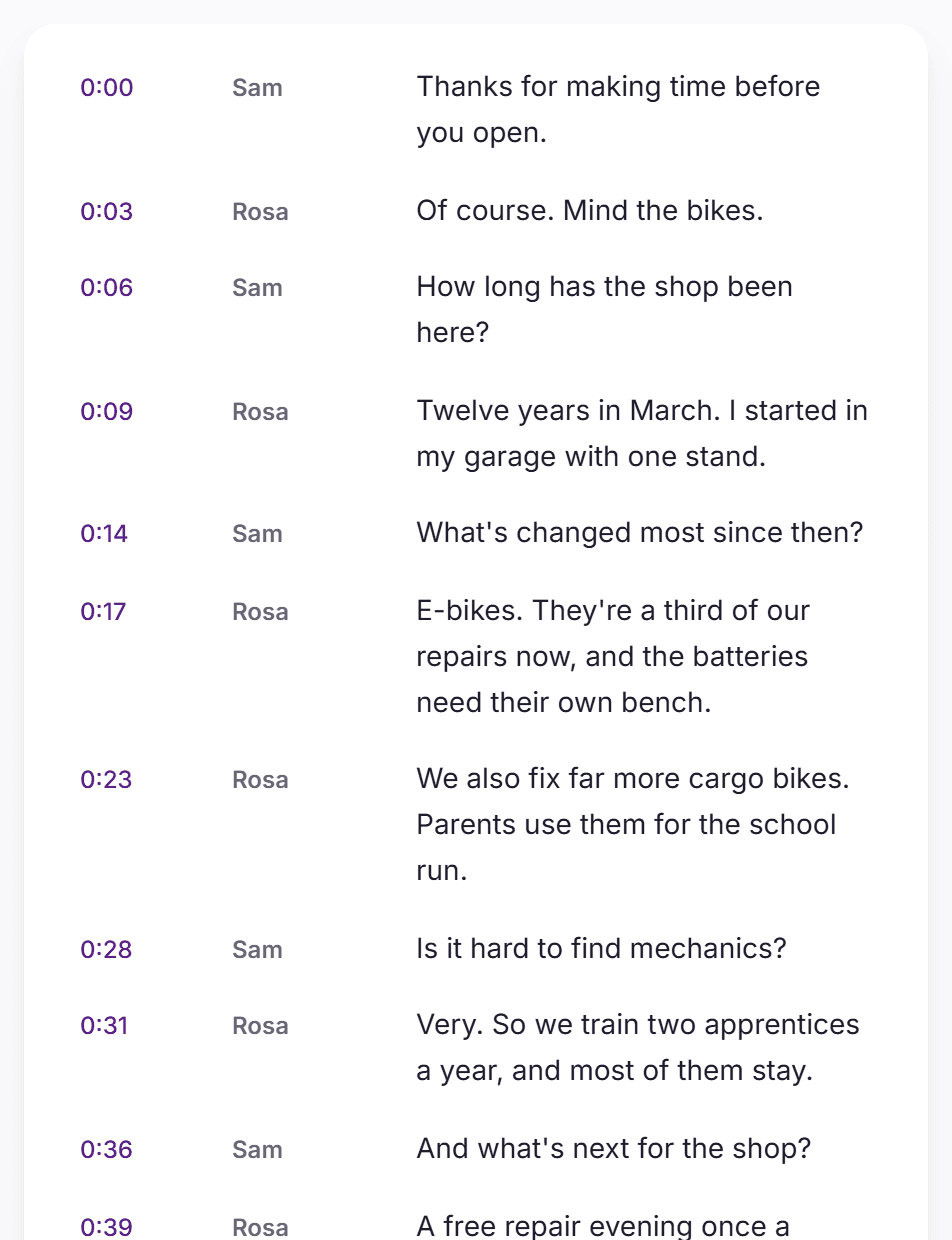
Whisper writes down what was said but not who said it. To label speakers you add a diarization model and match its speaker turns to Whisper's timestamps. Here are the three common ways to do it, with code.
By VexaScribe Editorial · Published June 23, 2026 · Rewritten November 17, 2026 · Checked against WhisperX 3.8.6 and pyannote.audio 4.1.0
Does Whisper do speaker diarization?
No. OpenAI's Whisper outputs one stream of text with timestamps and no speaker information, whichever model size you use. Speaker labels always come from a second model.
How it's done
Every approach follows the same three steps:
- Transcribe with Whisper, keeping timestamps, ideally per word
- Run a diarization model on the same audio to get speaker turns
- Give each word the speaker whose turn covers it, then rebuild sentences per speaker
Matching per word, not per sentence, matters: a sentence often contains the moment one speaker hands over to the next.
1. WhisperX (the usual choice)
WhisperX does all three steps in one package: faster-whisper for the text, wav2vec2 for word timings and pyannote's community-1 for speakers. You need a Hugging Face read token and to accept the community-1 conditions once.
pip install whisperx
whisperx meeting.wav --model large-v2 --diarize --hf_token YOUR_HF_TOKEN \
  --min_speakers 2 --max_speakers 4
Python usage and install details are on the WhisperX page.
2. whisper-diarization (no Hugging Face token)
whisper-diarization uses NVIDIA NeMo models instead of pyannote, so there's no gated model to accept. It first separates the voices from background music (Demucs), transcribes with Whisper, aligns words with ctc-forced-aligner, then assigns speakers and tidies the boundaries with a punctuation model.
git clone https://github.com/MahmoudAshraf97/whisper-diarization
cd whisper-diarization
pip install -c constraints.txt -r requirements.txt
python diarize.py -a meeting.wav --whisper-model large-v3
The default model is medium.en, so pass --whisper-model and --language for other languages. Use --no-stem to skip the music separation on speech-only audio. Its README notes that overlapping speakers aren't handled yet.
3. Whisper + pyannote, by hand
Build it yourself to control each part. pyannote 4 returns an exclusive diarization, with one speaker at a time, which makes the matching simple.
import whisper
from pyannote.audio import Pipeline

# 1. Words with timestamps
asr = whisper.load_model("turbo").transcribe("meeting.wav", word_timestamps=True)

# 2. Speaker turns, one speaker at a time
pipeline = Pipeline.from_pretrained(
    "pyannote/speaker-diarization-community-1", token="YOUR_HF_TOKEN"
)
turns = list(pipeline("meeting.wav").exclusive_speaker_diarization)

# 3. Give each word the speaker talking at its midpoint
def speaker_at(t):
    for turn, speaker in turns:
        if turn.start <= t <= turn.end:
            return speaker
    return None

for segment in asr["segments"]:
    for word in segment["words"]:
        word["speaker"] = speaker_at((word["start"] + word["end"]) / 2)
Words that fall in a gap get None; give them the previous word's speaker. Then group consecutive words with the same speaker into lines. Install steps for each part: Whisper and pyannote.audio.
Comparison
| WhisperX | whisper-diarization | By hand | |
|---|---|---|---|
| Speaker model | pyannote community-1 | NVIDIA NeMo (TitaNet) | pyannote community-1 |
| Hugging Face token | Yes | No | Yes |
| Word timing | wav2vec2 alignment | ctc-forced-aligner | Whisper's word timestamps |
| Extras | Batched, fast | Separates vocals from music first | Full control |
| Best for | Most people | No Hugging Face account | Custom pipelines |
What goes wrong
Two people talking at once
None of the three handles overlap well. The words of the quieter speaker are often lost or given to the louder one.
Short replies
"Yeah" or "right" under a second long often gets merged into the other speaker's turn.
The wrong number of speakers
Similar voices can be merged, and one voice can be split in two when its volume or distance from the mic changes. If you know the count, pass it (--min_speakers and --max_speakers, or num_speakers in pyannote).
Numbers without timings
In WhisperX, tokens like "2014." or "£13.60" can't be aligned, so they get no time and no speaker.
Labels across files
SPEAKER_00 in one file isn't the same person as SPEAKER_00 in the next. Matching people across recordings is speaker identification, a separate task.
Sources
- WhisperX (3.8.6) and pyannote.audio (4.1.0) READMEs, checked November 17, 2026
- whisper-diarization README (BSD-2-Clause)
- openai/whisper:
word_timestampsand model names
We didn't benchmark these tools ourselves. See our editorial standards.
Frequently Asked Questions
Can Whisper identify different speakers?
No. Whisper outputs text and timestamps only. To label speakers, run a diarization model such as pyannote on the same audio and match its speaker turns to Whisper's word timestamps, or use a tool that does both, such as WhisperX.
What's the easiest way to add speaker labels to Whisper?
WhisperX: pip install whisperx, accept the conditions of pyannote's speaker-diarization-community-1 model on Hugging Face, then run whisperx with --diarize and your Hugging Face token.
Can I diarize Whisper output without a Hugging Face token?
Yes. The open-source whisper-diarization project uses NVIDIA NeMo models instead of pyannote, so no gated model or token is needed.
How do I tell it how many speakers there are?
In WhisperX, pass --min_speakers and --max_speakers (the same number if you know it exactly). In pyannote, pass num_speakers, or min_speakers and max_speakers. It's the simplest way to stop one voice being split into two.
Why are some words given to the wrong speaker?
Usually overlapping speech, very short replies, or a speaker change in the middle of a Whisper segment. Matching speakers per word rather than per segment fixes the last one; the first two are limits of current diarization models.