Verified October 2026
Bulk Transcription — 50 Files per Upload, 200 per Export, One Flat Rate
Upload up to 50 audio or video files per batch, mixed formats, and export up to 200 transcripts at once as a single ZIP with your original filenames preserved. Export can translate the whole batch into any of 133 languages, with the minute cost shown per file before you commit. Flat-rate from $20/month for 6,000 minutes — no per-minute math. No AI training on your data, DPA on request.
VexaScribe takes up to 50 files per upload with mixed audio and video formats — MP3, M4A, WAV, FLAC, OPUS, MP4, MOV, MKV, WEBM — and exports up to 200 transcripts in one job as a single ZIP with original filenames preserved. Transcription runs on Whisper Large-v3 across 99 languages; we don't publish a single accuracy percentage, because one number measured on clean benchmark audio tells you little about your recordings — the languages section explains what actually moves it. Export can translate the entire batch into any of 133 languages, and shows the minute cost per file before you commit. Pricing is flat-rate ($2–$20/month, 200–6,000 minutes) rather than per-minute, which is what makes high-volume months predictable. No AI model training on user data, as a contractual commitment rather than a setting. DPA available on request for research labs, legal firms, and corporate procurement — data residency and sub-processor detail is covered there rather than published here. Honest scope: bulk is UI-first (drag-and-drop, dashboard, ZIP download) — not a programmatic API. If you need an API with S3 sync and webhooks, AssemblyAI or Deepgram are better fits today. 30 free minutes on signup, no credit card.
The essentials
- ●50 files per upload, 200 transcripts per export. Two different ceilings, and the difference matters: a 200-interview project is four uploads but a single export. Mixed audio and video formats throughout. No daily cap beyond your plan's monthly minutes.
- ●Two quality tiers, 99 languages either way. Standard costs one minute per audio minute and detects language per file; Premium costs two and is worth it on hard audio. We don't publish a single accuracy figure — see Standard or Premium for which to pick and languages for what actually moves accuracy.
- ●ZIP delivery with original filenames preserved. One output format per export job — run it again for a second format.
- ●Flat-rate $2–$20/month. At 100h/month: $20 vs $1,500 Rev AI vs $11,940 Rev Human. For pure-API consumers, AssemblyAI batch still wins at $15.
- ●No AI training on user data, committed contractually. Data residency and sub-processor detail is in our DPA rather than on this page.
- ●Honest scope: UI-first today. Drag-and-drop, dashboard, ZIP download. No programmatic API yet — if you need one, AssemblyAI or Deepgram are stronger fits.
- ●DPA + NDA available for research labs (IRB), legal firms (privileged data), and corporate procurement.
Who actually needs bulk transcription
“Bulk transcription” is a B2B-leaning query — almost no consumer searches it. The six personas below cover ~95% of real bulk customers. Each has a distinct pain that shapes which tool wins.
Content / marketing agency
5–30 client podcasts or videos per week
Per-minute pricing kills margin, manual one-by-one uploads burn the producer's day, needs branded DOCX + SRT deliverables per client.
Academic / UX research team
Just finished a study with 50–200 interviews
Needs verbatim transcripts, consistent speaker labels, NVivo / ATLAS.ti / MAXQDA import, IRB-compliant data residency, one-shot ZIP delivery.
Legal / paralegal team
Deposition or discovery batches
Confidentiality (no AI training), retention controls, accurate timestamps, DPA + NDA on file before any data moves.
Media archive / newsroom
Years of interviews, broadcasts, podcasts to digitize
Wants to make a back catalog searchable, EU residency for European partnerships, predictable monthly cost rather than per-minute archive billing.
B2B product builder
Building an app where transcription is one feature
Per-minute API math, webhook reliability, predictable monthly cap. Honest note: if you need a true bulk API today, AssemblyAI ($0.15/hr) or Deepgram ($0.26/hr) are stronger fits — VexaScribe bulk is UI-first.
Educator / course producer
Library of lectures, webinars, or training sessions
Accuracy on technical jargon, batch SRT export for WCAG/EAA accessibility compliance, multiple language tracks for international cohorts.
Across all six personas, the common pain is the same in different language: per-minute pricing destroys budget predictability as volume grows, one-by-one uploads waste hours, compliance documentation is needed for procurement, and consistent output matters for downstream automation. Bulk transcription is not a discount feature — it's a workflow feature.
How VexaScribe bulk works (3 steps)
- 1
Drag a folder
Select up to 50 files at once from your desktop, or drop a folder onto the upload area. Larger projects just repeat this step — the 50 applies per upload, not per project. Mixed formats are fine: MP3 + M4A + MP4 + WAV in the same batch. Audio is extracted from video automatically.
- 2
Pick languages, formats, options
Auto-detect language per file (recommended) or force a single language. Choose output formats — pick one or several: TXT, DOCX, SRT, VTT, PDF, JSON. Toggle diarization on/off.
- 3
Walk away, return to a ZIP
Processing happens in parallel. The dashboard shows per-file progress. When it is done, select what you want and export up to 200 transcripts as a single ZIP with the original filenames preserved. Partial-batch download is supported if some files fail.
Typical processing speed: 5–10 minutes per hour of audio under normal load. A 50-file batch of one-hour interviews completes in roughly 60–90 minutes (parallelized) — not 50 hours of sequential processing.
The math: flat-rate vs per-minute (100-hour project)
The load-bearing question for buyers. We picked 100 hours because it's the realistic size of one research study, one media archive sprint, or one quarter of a marketing agency's podcast workload. Competitor figures are each vendor's published list price as of writing — worth re-checking before you budget against them, since they change.
| Provider | Calculation | 100h total | Note |
|---|---|---|---|
| Rev AI | 100h × $0.25/min × 60 | $1,500 | Per-minute AI; human is 8× more |
| Rev Human | 100h × $1.99/min × 60 | $11,940 | Verbatim certified for legal/broadcast |
| Otter Business | $30/user/mo, capped 6,000 min/user | $30 (fits 100h) | No Portuguese support |
| AssemblyAI batch | 100h × $0.0025/min × 60 + add-ons | ~$15 base, ~$54 loaded | API only, no UI |
| Trint BulkScribe | Custom enterprise contract from ~$0.20/h | ~$20+, contract required | Enterprise sales cycle |
| VexaScribe Studio★ | Flat monthly subscription | $20 / month | UI-first, ZIP delivery, flat monthly rate |
Honest read of this table
Flat-rate dominates per-minute pricing once you exceed ~5 hours/month, and dominates seat-based pricing once you exceed one user's needs. For pure-API consumers (developers building a transcription feature into their own product), AssemblyAI's $15 base is genuinely cheaper than VexaScribe Studio's $20 — we don't compete on that segment, and we'll tell you that honestly rather than pretend our UI matters to a developer building a SaaS. For everyone else — agencies, researchers, legal teams, media archives, educators — the managed UI plus flat-rate pricing with procurement-ready documentation is the better deal.
Batch mechanics: queues, parallelism, failure handling
The boring details that matter when you're processing a few hundred files and some of them are not clean.
- ●Mixed-format support. MP3, M4A, WAV, FLAC, OGG, OPUS, MP4, MOV, MKV, WEBM, AVI in one batch. Audio is extracted from video automatically — no pre-conversion needed.
- ●Parallel processing. Multiple files transcribe simultaneously, not sequentially. A 50-file batch of one-hour interviews finishes in 60–90 minutes total, not 50 hours.
- ●Per-file status dashboard. Each file shows: queued, uploading, processing, complete, or failed-with-reason. Refresh anytime; nothing is lost if you close the tab.
- ●Independent failure handling. If 3 of 50 files fail (corrupted header, no audio track, exceeds 10-hour cap), the other 47 finish normally. Failed files retry once free; you can fix and re-upload manually after that.,Exports report what they skipped. A finished export tells you how many transcripts made it into the ZIP and lists any it left out, so you never have to diff a 200-file archive against your selection to find out something is missing. On a translated export you also get the counts: served from cache, translated fresh, and failed.,
- ●Speaker labels — honest limit. Diarization is consistent within each file (Speaker 1 through Speaker 10) but NOT auto-matched across files. The bulk-rename UI applies consistent labels across all files in a batch in one operation — typical research study with one interviewer and many participants takes ~30 seconds total to relabel.
- ●Partial-batch download. Don't wait for stragglers — download a ZIP of completed files anytime. Failed files can finish later and be downloaded separately.
Standard or Premium, and why it matters more on a batch
You pick a transcription quality when you upload, and on a large batch it is the most expensive decision on the page. Standard spends one minute of your balance per minute of audio. Premium spends two. Both cover the same 99 languages, so this is not a coverage question — it is a question of how hard your audio is.
The upload dialog shows the arithmetic before you commit: it adds up the batch and tells you what it will consume against your remaining balance, so a 200-minute batch reads as 200 minutes on Standard and 400 on Premium. Worth checking on a big run, because the difference is a doubling rather than a rounding error.
Our honest guidance: start on Standard. For clear single-speaker audio — a podcast with a decent microphone, a lecture recording, a one-on-one interview in a quiet room — the extra minutes usually buy you very little. Premium earns its cost on the audio that is genuinely hard: heavy background noise, strong accents the model sees rarely, several people talking across each other, or a recording you cannot redo. The 30 free minutes exist for exactly this test — run your worst file both ways and compare before committing a 200-file batch.
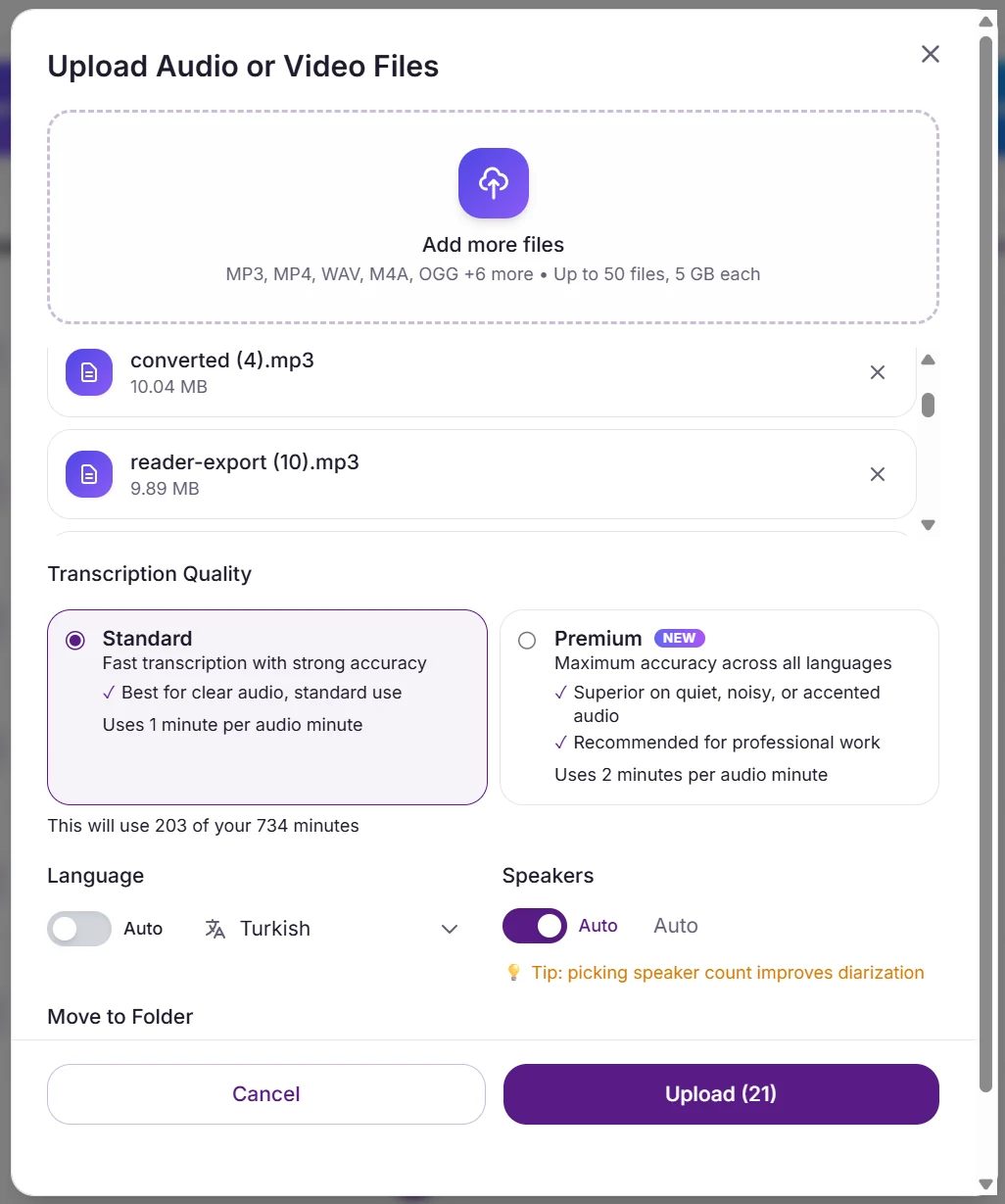
The upload dialog totals the batch against your balance before you commit, so the 1× versus 2× difference is visible rather than something you work out afterwards. Language and speaker count are set here too.
One combination to avoid on a batch
Do not pair Premium with Auto language detection. The Premium engine handles a mixed-language set by picking the nearest language it supports and transcribing confidently in that one — it does not error, and it does not fall back. Every job reports success and the text is wrong. On one file you would notice. On two hundred you might not until someone opens the fortieth transcript. If you are running Premium, set the language explicitly; if your batch genuinely contains several languages, either run Standard, which detects per file, or split the batch by language and set each one.
The quality tier is fixed when the file is processed. Changing your mind means re-uploading and spending the minutes again, which is the other reason to test on one file first rather than discovering it at the end of a large job.
Output formats and what lands in the ZIP
Pick a format and the whole selection comes back in it, up to 200 transcripts per export job. The ZIP preserves your original filenames with the extension matched to the output (interview.mp3 → interview.docx, interview.srt, and so on). Available formats: TXT, DOCX, SRT, VTT and JSON — one per export job, so run it again if you need the same batch in a second format.
| Format | Contains | Typically used by |
|---|---|---|
| TXT | Plain text, raw transcript | Quick read, copy-paste, LLM prompt input |
| DOCX | Word document with speakers, timestamps | Researchers (NVivo/ATLAS.ti import), journalists, legal teams |
| SRT | Subtitle file with timing | Video creators, YouTube, Premiere, DaVinci, CapCut |
| VTT | Web subtitle (HTML5 video) | Web players, browser-native captions |
| Formatted, print-ready transcript | Client deliverables, legal exhibits, archives | |
| JSON | Structured with word-level timestamps | Developers, search indexing, custom downstream tools |
Filenames are the thing that makes a 200-file ZIP usable: interview-maria-2026-06-10.mp3 comes back as interview-maria-2026-06-10.srt, so a script can map outputs to sources without a lookup table. If you need structured per-file data for a search index or a database, export as JSON — it carries the transcript with its timings rather than just the text.
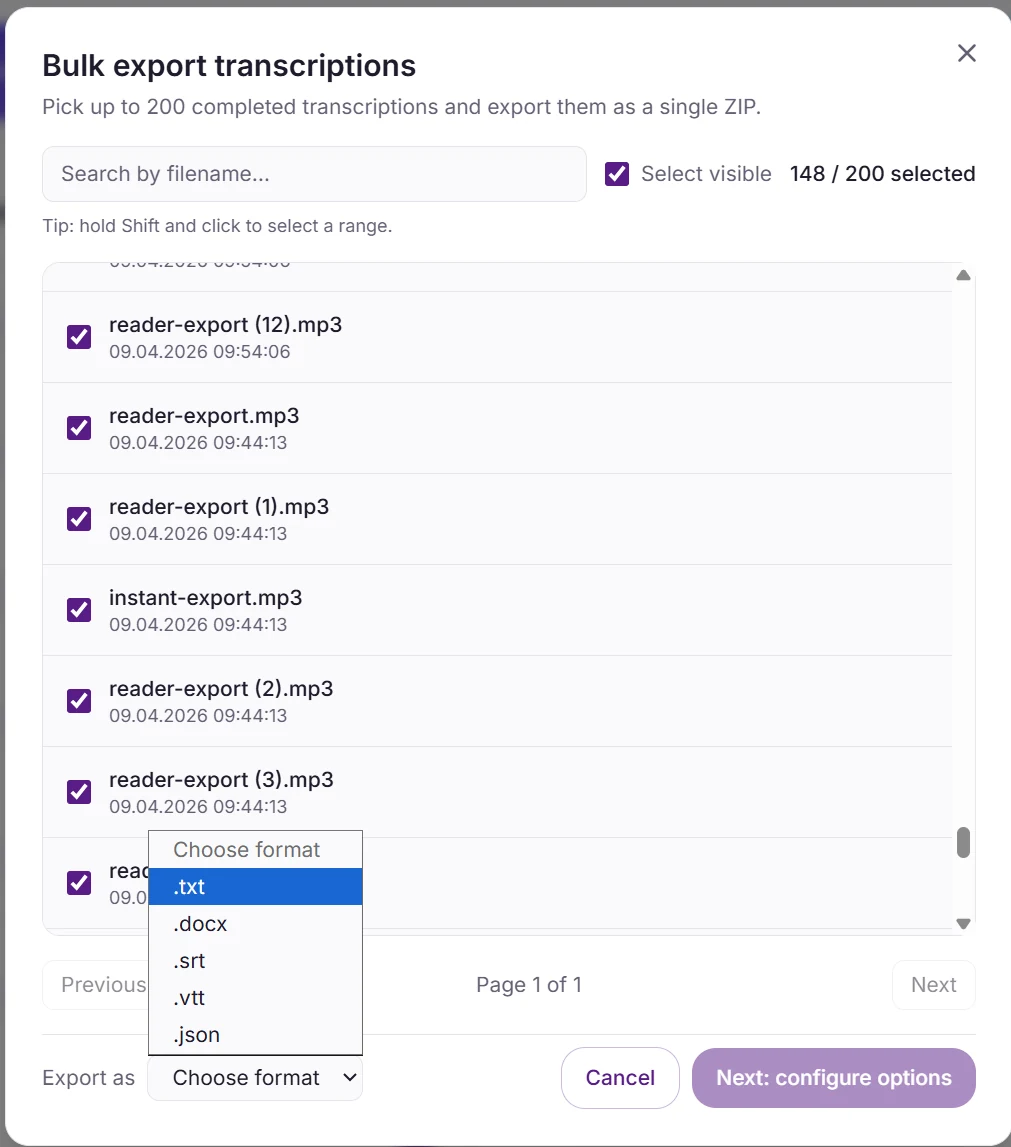
Selection is capped at 200 per export job, and format is a single choice rather than a multi-select — which is why a batch you want in two formats means running the export twice.
Three export settings are worth knowing before you run a large job, because they apply to the entire selection at once. Speaker names lets you map Speaker 1 and Speaker 2 to real names across the whole batch rather than editing each file. Word-level timings in the JSON export give you per-word timestamps for anything you intend to process programmatically. And speaker labels and timestamps can each be turned off, which is what you want when the transcripts are headed for analysis software that expects clean prose.
Translating a whole batch
Translation happens at export, not at upload — which matters for how you plan a project. You transcribe once in the source language, then export the same set as many times as you need: the original, a translated set for a partner, another language for a client. The transcription minutes are spent once.
The flow is: select the transcripts, pick a format, then turn on translation and choose one of 133 target languages along with whether to keep speaker labels and whether to merge consecutive lines from the same speaker. Those toggles apply to every item in the batch. The cost appears on the step after that, before anything is charged. One target language per export job; run the export again for a second language.
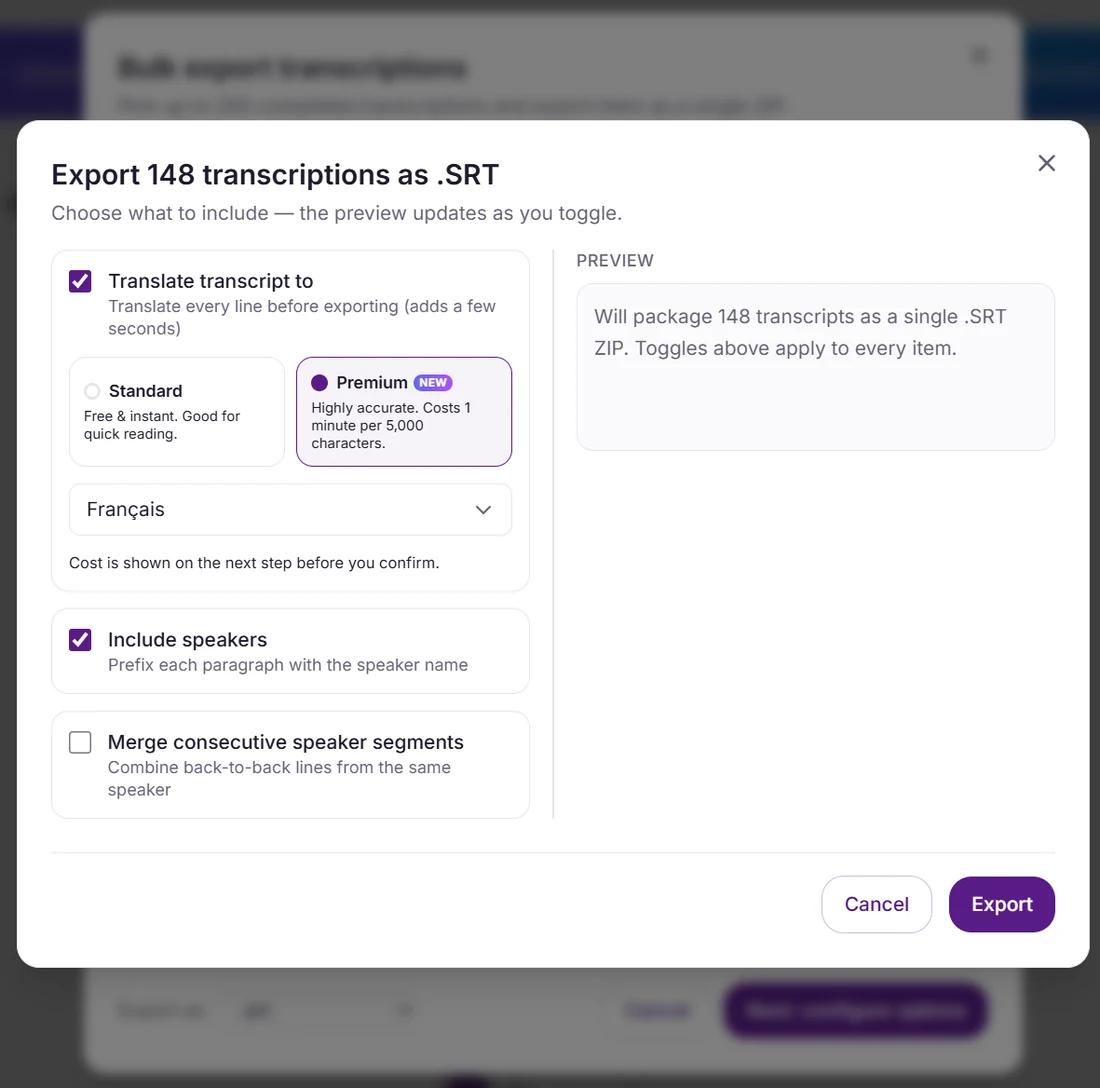
Translation is a toggle on the export itself, and every setting here applies to all 148 items. Cost appears on the following step, before anything is charged.
You see the cost before you commit
This is the part worth knowing if you are budgeting a large multilingual project. Premium translation costs minutes, so before anything is charged a preflight runs and returns a per-file breakdown: character count and minute cost for each transcript, the total, how many files are already cached, and whether your current balance covers it. If it does not, it names the plan that would. Nothing is deducted and no job is created until you confirm.
| What the preflight tells you | Why it matters on a large batch |
|---|---|
| Minutes per file, and the total | Billing is 1 minute per 5,000 source characters, so cost tracks transcript length rather than audio length. A dense 40-minute interview can cost more to translate than a sparse 90-minute one. |
| How many files are already cached | A transcript already translated into that language costs zero minutes to export again. Re-running a 200-file export after fixing two transcripts charges you for two files, not 200. |
| Whether your balance covers it | You find out before starting, not halfway through. If it falls short, the preflight names the plan that would cover the job. |
After the export finishes you get the matching summary: how many were served from cache, how many were translated fresh, how many failed, and the total minutes actually deducted. A translation that errors server-side refunds its minutes automatically, so a partial failure does not quietly cost you.
Standard or Premium
Both engines are available on every plan. Standard is free and does not consume minutes. Premium costs minutes and reads each line more carefully — proper names and place names stay as names instead of being translated into words, idioms come out as natural phrasing rather than word-for-word, and the speaker's register is preserved. For a research corpus or anything a client will read, Premium is usually worth the minutes; for a rough gist of what is in a file, Standard is enough. Bulk export uses the Premium engine, which is why it carries a cost preflight at all.
Translating a single transcript, or want the mechanics in more depth? See the transcribe-and-translate guide. Note the honest boundary: this translates transcripts, so the audio stays in its original language — there is no dubbing or voice-over step.
Data handling, and what we'll put in writing
What procurement, legal, and IT usually ask first. The commitments below are the ones we can state publicly; anything specific to our infrastructure or sub-processors lives in the DPA rather than on a marketing page.
No AI training
A contractual commitment in our Terms and DPA: your audio and transcripts never train any model, ours or anyone else's. This is the one procurement question we can answer without caveats.
Retention and deletion
30-day default retention after transcription. Auto-delete on transcript download is available on Pro and Studio. A deletion request is honoured on any plan, and removes the transcript and its derivatives rather than hiding them.
Encryption
Encrypted in transit and at rest, end to end — upload, processing, and download. Audit logs are available on Studio and Enterprise plans.
DPA + NDA
Standard GDPR Article 28 DPA on request, typically 1–2 business days. Project-specific NDAs for sensitive batches such as legal investigations or media archives, 2–5 day turnaround.
Data residency and sub-processors
Covered specifically in our DPA rather than published here, including processing locations and every sub-processor with its role. Ask and we will send it before you upload anything.
We deliberately do not publish our infrastructure, vendors, or processing locations on this page. Everything a security review needs — every sub-processor with its role, where each processing step happens, and the jurisdictions involved — is set out specifically in the DPA, which we will send before you upload anything. One thing worth raising early rather than late: if you work in an adversarial legal context, where the question is not just who can access data but which courts can compel it, tell us at the start. That constraint changes what we recommend, and it is a much cheaper conversation before a 200-file batch than after one.
Languages, accuracy, and what actually moves it
Transcription runs on Whisper Large-v3 across 99 languages. A bulk batch can mix languages freely — each file is detected independently from its first 30 seconds, so a folder of English, Portuguese and Japanese interviews needs no sorting before upload.
We group languages into tiers rather than publishing a percentage per tier. The grouping follows how much training data the model saw for each language, which is the documented driver of the difference. The percentages we used to print here were not measurements we made against a labelled reference set, so they are gone — and on a page aimed at people about to commit a 200-file project, an invented number is worse than none.
Tier 1 — strongest
English, Spanish, French, German, Italian, Dutch, Russian, Polish, Portuguese (PT and BR), Japanese, Mandarin, Korean.
Tier 2 — solid
Arabic, Turkish, Hindi, Vietnamese, Thai, Indonesian, Ukrainian, Czech, Hungarian, Romanian, Swedish, Danish, Finnish.
Tier 3 — test first
Swahili, Bengali, Punjabi, Tamil, Telugu, Welsh, and other lower-resource languages. Run a sample through before committing a large batch.
What reliably costs you accuracy is the recording, not the language: music under speech, two people talking over each other, a phone on a meeting table rather than near the speaker, and proper nouns or jargon the model never saw. The 30 free minutes on signup exist for exactly this — run the worst file in your set first, because that tells you more about your project than any benchmark table.
Notable PT-BR differentiator: Otter.ai does NOT support Portuguese in 2026 — its official supported languages are English, French, and Spanish only. For Brazilian agencies, Portuguese-language researchers, and LATAM media operations, VexaScribe is the practical choice over Otter for bulk Portuguese workloads. We cover this in depth in our PT-BR transcription guide.
Frequently asked questions
How many files can I upload at once in a bulk batch?
Two limits apply and they are different numbers. Uploading: up to 50 files per batch, on every paid plan. Exporting: up to 200 transcripts in a single job. So a 200-interview study is four uploads but one export — you do not have to stitch four ZIPs together afterwards. The 50-file upload ceiling is generous for most workflows: a research lab with 30 hour-long interviews fits in one batch; a podcast agency with weekly client deliverables runs one batch per client. If you need more, run consecutive batches — there's no per-day or per-account cap beyond your plan's monthly minutes. The 50-file ceiling exists because larger batches degrade UI responsiveness; processing 200+ files via API is on the roadmap for developer use cases.
What's the maximum file size and total batch size limit?
Per file: 5 GB with no duration cap (whichever comes first). Per upload: 50 files. Per export job: 200 transcripts. There is no hard total-batch-size limit beyond the per-file cap × 50 — so a theoretical maximum batch is 50 files × 5 GB = 250 GB, though we recommend keeping batches under ~25 GB in practice for upload reliability over typical office internet. Long files (3-10 hours) work fine — common with full-day depositions, half-day workshops, or oral-history projects. For files over 10 hours, split before upload using a free tool like ffmpeg or Audacity.
Do you support mixed formats (MP3, M4A, MP4, WAV) in one batch?
Yes — mix any combination of MP3, M4A, WAV, FLAC, OGG, OPUS (audio) plus MP4, MOV, MKV, WEBM, AVI (video) in a single batch. Audio is extracted from video automatically — no need to pre-convert. Each file is detected, processed, and transcribed independently; the batch waits for all files to finish before delivering the ZIP. Mixed-format support matters for real workflows: an agency receives MP3s from one client, M4As from iPhones, MP4s from Zoom recordings — they shouldn't have to pre-process everything just to transcribe.
What happens if one file fails mid-batch — do I lose the others?
No. Each file is processed independently. If 3 of 50 files fail (corrupted audio, unsupported codec, exceeds duration cap), the other 47 finish and you can download a partial ZIP containing the successful files. Failed files appear in the dashboard with the specific error reason — corrupted header, no audio track detected, file exceeds 10 hours, etc. You can retry failed files individually (free retry within 24 hours) or fix the source and re-upload. The batch never silently swallows failures, and successful work is never blocked by a single bad file.
Can I download the whole batch as a ZIP with original filenames?
Yes. The ZIP preserves your original filenames — “interview-maria-2026-06-10.mp3” becomes “interview-maria-2026-06-10.docx” (or .srt, .txt, etc., depending on the format you picked). That is what makes a 200-file archive usable: a script can map every output back to its source without a lookup table, whether you are feeding a CAQDAS tool like NVivo or ATLAS.ti, a CMS, or a shared drive. One format per export job, so if you want the same batch as both .docx and .srt, run the export twice. For structured per-file data, export as JSON — it carries the transcript with its timings rather than just the text.
What's the difference between Standard and Premium transcription?
It is a cost-versus-difficulty trade, chosen at upload. Standard spends one minute of your balance per minute of audio; Premium spends two. Both cover the same 99 languages, so it is not a coverage question. For clear single-speaker audio — a podcast with a decent microphone, a lecture, a quiet one-on-one interview — Standard is usually enough and the extra minutes buy little. Premium earns its cost on genuinely hard audio: heavy background noise, strong accents, several people talking over each other, or a recording you cannot redo. The upload dialog totals the batch and shows what it will consume before you commit, so you can see the doubling. One warning specific to batches: do not pair Premium with Auto language detection. The Premium engine handles an unclear language by picking the nearest one it supports and transcribing confidently in that — no error, no fallback, every job marked successful. Set the language explicitly when running Premium, or use Standard, which detects per file.
Can I translate a whole batch, not just transcribe it?
Yes, and it happens at export rather than at upload — which is better for planning a project, because you transcribe once and can export the same set repeatedly: the original, a translated set for a partner, another language for a client. Select the transcripts, pick a format, choose one of 133 target languages, and the whole selection comes back translated in the ZIP with the same filename structure. One target language per export job, so run it again for a second language. Premium translation costs minutes (1 minute per 5,000 source characters), so before anything is charged you get a preflight: the character count and minute cost for every file, the total, how many are already cached, and whether your balance covers it — and if it does not, which plan would. Nothing is deducted until you confirm. Re-exporting a transcript already translated into that language costs zero minutes, so fixing two files in a 200-file set and re-running charges you for two.
Are speaker labels consistent across files in the same batch?
Speaker labels are consistent WITHIN each file (Speaker 1, Speaker 2... up to 10) but NOT auto-matched ACROSS files. This is an honest technical limitation of diarization in 2026: cross-file speaker identification requires voice-print enrollment, which adds complexity and privacy implications we've chosen not to ship. Workaround: use the bulk-rename UI in the dashboard to apply consistent labels (Speaker 1 → “Interviewer”, Speaker 2 → “Participant”) across all files in a batch in one operation. For research studies where the same interviewer appears in all 50 files, this takes ~30 seconds total. We're transparent about this because over-promising cross-file matching is a common industry trap.
Do you train your AI models on my files?
No. We contractually commit to never training models on user audio or transcripts, and the commitment is verifiable in our Terms and DPA — it is not a setting you have to find and switch off. The same obligation is passed through to everyone who processes data on our behalf; they are each named in the DPA, with their role. Worth knowing when you compare: Otter.ai trains on user audio by default and requires a manual opt-out, so for a sensitive batch the default matters more than the option.
How is my data protected, and what's in the DPA?
Three things we state publicly. Your data is encrypted in transit and at rest throughout. We commit contractually — in our Terms and DPA, not as a toggle you have to find — to never training models on your audio or transcripts, and that obligation is passed through to everyone who processes data on our behalf. And audio is retained 30 days after transcription by default, with your files staying in your library until you delete them; a deletion request removes the audio, transcript, translations and summaries rather than just hiding them from your view. What we deliberately do not publish here: storage locations, processing locations, and vendor names. That belongs in a document we can be held to, so it is set out specifically in the DPA — every sub-processor with its role and the locations involved — and we will send it before you upload anything. If residency in a particular jurisdiction is a hard requirement for your work, raise it at the start rather than after a 200-file batch: it changes what we recommend, and it is a much cheaper conversation early.
Is there a bulk API for S3 / webhook workflows?
Not yet. Bulk transcription is UI-first — drag-and-drop folder upload, dashboard status, ZIP download. Programmatic API access (POST a list of S3 URLs, receive webhooks per file completion) is on the roadmap but not shipped. If your workflow strictly requires API/webhook integration with S3 sync, we honestly recommend AssemblyAI ($0.15/hr Universal with diarization included), Deepgram Nova-3 ($0.46/hr + $0.12/hr diarization = $0.58/hr), or Azure Speech Fast Transcription batch ($0.18/hr with diarization free) — all have mature batch APIs. For everyone else (agencies, researchers, legal teams, podcasters), the UI workflow is faster than wrangling API code: drag a folder, walk away, return to a ZIP. We'll announce API access here when it ships.
How does flat-rate pricing compare to Rev, Otter, AssemblyAI, or Deepgram for 100 hours?
For 100 hours (6,000 minutes) in a single month, using each vendor's published list price at the time this page was written — check current pricing before relying on it, since these change: Rev AI $0.25/min = $1,500. Rev Human $1.99/min = $11,940. Otter Business $30/user/month, but Pro was cut from 6,000 to 1,200 min/mo in 2025 without a price drop — you'd need Business tier at 6,000 min/mo, or a second seat. AssemblyAI Universal $0.15/hour with diarization included = $15 (genuinely cheaper if you only need API access and can wire up your own workflow). Deepgram Nova-3 $0.46/hour base + $0.12/hour diarization = $58 total for 100 hours. Azure Speech Fast Transcription (batch) $0.18/hour with diarization free = $18. Trint BulkScribe starts around $0.20/hour but requires enterprise contract negotiation. VexaScribe Studio is $20/month flat for 6,000 minutes = 100 hours, with a UI-first workflow (drag folder → walk away → download ZIP) instead of API code. The pattern: flat-rate dominates per-minute once you exceed ~5 hours/month, and dominates seat-based once you exceed one user's needs. For pure API consumers wiring their own S3 + webhook pipeline, AssemblyAI or Azure batch may still win on raw cost — we don't compete on that segment.
Is bulk transcription supported in Portuguese, Spanish, and other languages?
Yes — all 99 Whisper languages are supported in bulk, and a single batch can mix them (each file is detected independently). We group languages by how much training data the model saw rather than publishing a percentage per tier, because the percentages we used to print were not measurements we made. Strongest tier: English, Spanish, French, German, Italian, Portuguese (PT and BR), Dutch, Russian, Polish, Japanese, Mandarin, Korean. Solid tier: Arabic, Turkish, Hindi, Vietnamese, Thai, Indonesian, Ukrainian, Czech, Hungarian, Romanian. Test-first tier: Swahili, Bengali, Tamil, Welsh, and lower-resource languages. A single batch can contain mixed languages — language is auto-detected per file from the first 30 seconds. Notable: Otter.ai does NOT support Portuguese in 2026 (English/French/Spanish only), making VexaScribe a practical choice for Brazilian agencies, Portuguese researchers, and LATAM media operations.
Can I bulk-transcribe an entire podcast catalog?
Yes — this is one of the most common bulk use cases in 2026. Typical workflow: export MP3s from your host (Buzzsprout, Transistor, Libsyn, Spotify for Podcasters all support bulk download), drop up to 50 episodes into a single batch, walk away, come back to a ZIP of .docx for every episode — then run the export again as .srt if you also want captions, since each export job produces one format. For catalogs over 50 episodes, run sequential batches — a 200-episode back catalog is typically 4 batches over an afternoon. Format tip: export .srt as a second pass if you plan to add captions to YouTube uploads or generate audiograms, and export .json if you want to pipe episodes into a search index or a Notion/Airtable database — JSON keeps the timings, which plain text does not. Cost comparison for a 100-episode catalog at ~45 min/episode (75 hours total): Rev AI $1,125, Otter Business ~$60/mo (but 6,000 min cap forces 2 months = ~$60), VexaScribe Studio $20 flat for the month. The pattern: flat-rate wins hard the moment you have a real back catalog rather than a single episode.
Can I get a DPA or sign an NDA for a legal or research batch?
Yes. We provide a standard Data Processing Agreement (DPA) on request to any paid account — typical for research labs needing IRB documentation, legal firms with privileged client data, and corporate buyers requiring procurement review. NDAs for specific projects (large media archives, sensitive corporate audio, legal investigations) are signed on a case-by-case basis. Email contact@aisolutionlabs.ai with your batch details (estimated volume, sensitivity level, retention requirements) and put DPA request in the subject line. The standard DPA covers GDPR Article 28 processor obligations, full sub-processor disclosure (each named, with their roles and locations), data residency, and the no-AI-training clause. Turnaround is typically 1-2 business days for DPA, 2-5 days for custom NDA.
Methodology and sources
- ● Competitor pricing taken from vendor sites as published: Rev.com, Otter.ai, AssemblyAI, Deepgram, Trint, OpenAI Whisper API. Pricing changes — always confirm on the source.
- ● Whisper Large-v3 (the base model our Turbo variant derives from): OpenAI, November 2023. MIT license. Paper: Radford et al. “Robust Speech Recognition via Large-Scale Weak Supervision” (2022).
- ● GDPR: Regulation (EU) 2016/679, Article 28 (processor obligations).
- ● Otter.ai PT-BR support: verified on otter.ai/languages June 2026 — English, French, Spanish only.
Related guides
Interview transcription
Qualitative research, journalism, legal — the natural bulk use case
Podcast transcription
Multi-client agency workflows, audiogram production
Daily transcription workflow
For teams transcribing every day — scheduling, retention, cost
Qualitative research
NVivo, ATLAS.ti, MAXQDA workflows for academic batches
SRT generator
Batch SRT export for accessibility-compliant video
Sermon transcription
Backfilling years of historical church sermon archives
Best subtitle tools 2026
12 tools compared honestly for accessibility / EAA compliance
AI transcription
How the Whisper model family actually works under the hood
Transcription cost
Per-minute vs flat-rate vs human — the full picture
Best diarization tools
Speaker separation depth across 14 tools
Speaker labels — how they work
Pipeline, accuracy, formats — the cross-file limitation explained
Pricing
Plans and effective per-minute cost at each tier
Features
Full product capability list
About
Team, mission, editorial standards