Voice recorder with transcription — the four paths, honestly compared (2026)
Four paths for recording audio and getting text back: AI wearables (Plaud NotePin & NotePin S, Limitless Pendant — discontinued after Meta acquisition, Friend AI, Omi open-source, Soundcore Work), traditional hardware recorders (EVISTR AI, Sony ICD-UX570, Olympus VP-10, TASCAM DR-05X, Zoom H1essential), phone apps with built-in transcription (Google Pixel Recorder, iOS Voice Memos on iOS 18+, Samsung Voice Recorder, Otter, Notta), and the web upload workflow (record with anything → upload MP3/WAV to VexaScribe, TurboScribe, or Whisper local). Honest ranking that includes Limitless's current status, real accuracy data (92-97% on clean audio — not marketing 99%), and a price comparison across all four paths.
Or record straight into this page — 5 minutes free, no account
By the VexaScribe Editorial Team · Published · Updated
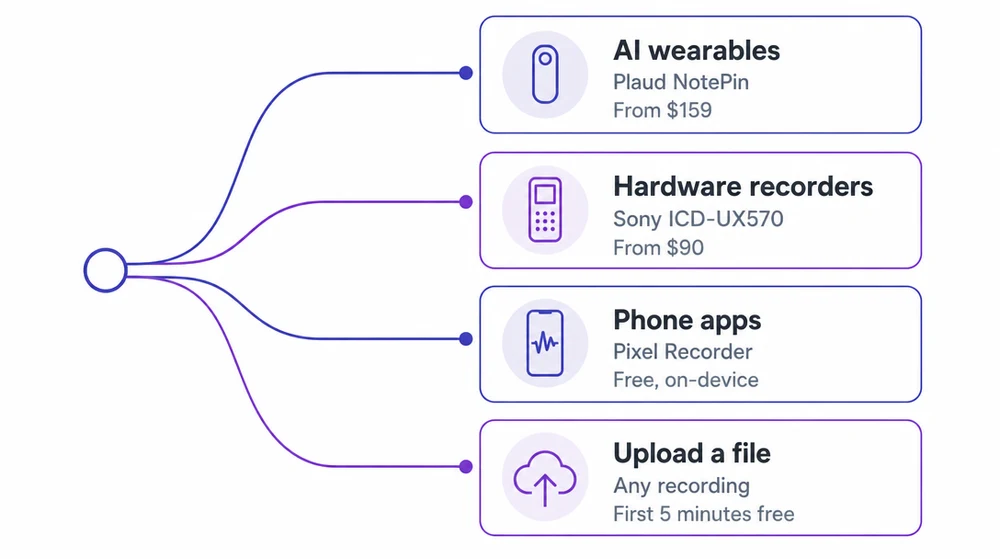
The Four Paths: AI Wearable vs Hardware Recorder vs Phone App vs Web Upload
“Voice recorder with transcription” means different things depending on how you work. There are four architectural paths in 2026 — and picking the right one depends on your battery, storage, discretion, privacy needs, and whether you want the recorder always on around your neck, not on which single tool is “best.”
Path 1 — AI Wearable
Plaud NotePin/NotePin S, Friend AI, Omi — ambient always-on pendants and pins. Best if you want to capture unplanned conversations without pulling out a phone. Limitless is discontinued (Meta acquisition, Dec 2025); Plaud NotePin S is the category leader in 2026.
Path 2 — Traditional Hardware Recorder
EVISTR AI, Sony ICD-UX570, Olympus VP-10, TASCAM DR-05X, Zoom H1essential. Best mic quality, longest battery, most discreet form factor. Journalism, interviews, depositions, field recording.
Path 3 — Phone App
Google Pixel Recorder, iOS Voice Memos (iOS 18+), Samsung Voice Recorder, Otter, Notta — record and transcribe in one place. Always with you, mostly free on modern phones.
Path 4 — Web Upload
Record with anything, then upload the file to VexaScribe / TurboScribe / Whisper local. Cheapest per file, best if you already have a recorder or record on multiple devices.
AI Voice Recorder Wearables — the 2026 Wave (and What Happened to Limitless)
Sources for the Limitless status below: Meta's acquisition and the end of Pendant sales were reported by CNBC on December 5, 2025, alongside coverage of what happens to existing units. Verified September 2026.
The AI-wearable-recorder category exploded in 2024-2025 with Plaud, Limitless (rebranded from Rewind), Friend, Omi, and others. Meta acquired Limitless in December 2025 and immediately halted new pendant sales — existing units still work but the product is not being sold. That shifted the 2026 landscape: Plaud NotePin (and NotePin S) is the current category leader, with Omi as the open-source alternative for former Limitless users who now value data ownership over polished software.
These devices share a common workflow: record everything all day, sync recordings + AI transcripts + AI summaries to a companion app (or open-source stack), and let you search across your entire audio history. Below is our honest 2026 ranking with current status flags.
#1 — Plaud NotePin (& NotePin S)
Visit →The category leader after Limitless exited. NotePin $159, NotePin S $179 with tactile button. Includes 300 transcription min/mo Starter plan. Pro ~$99.99/yr for more minutes. Magnetic pin, clip, wristband, lanyard wearing options. GPT-4-based summaries. Verified August 2026.
#2 — Plaud Note (card)
Visit →The original credit-card form factor that snaps to the back of your phone. Same $159 price + Starter plan. Better mic for meeting rooms than the pin. Same app + transcription stack.
#3 — Limitless Pendant
Visit →⚠️ Sales ended December 5, 2025 when Meta acquired Limitless; service withdrawn entirely in the EU, UK and several other markets on the same date. Existing units still work — backend committed at least a year — but new units are not sold. If you want a Limitless-style always-on pendant in 2026, see Omi (open-source alternative) or the Plaud NotePin S.
#4 — Rewind Pendant
Visit →⚠️ Sunsetting as part of the Limitless/Meta transition. The Mac Rewind app is winding down; existing pendants still work. Not recommended for new buyers.
#5 — Friend AI Pendant
Visit →$129 always-listening companion pendant (raised from initial $99 preorder). Focused on emotional-companion use, not professional transcript export. Do not buy for meeting/interview transcription — different product category.
#6 — Omi (open-source alternative)
Visit →Open-source hardware + software. Popular migration target for former Limitless users. Similar always-on form factor without vendor lock-in. Reasonable choice if you value data ownership over polished software.
#7 — Soundcore Work AI Voice Recorder
Visit →Anker-owned. Near real-time speech-to-text in 100+ languages, noise-suppression mics, ~$150. Cloud sync + AI summaries. More of a handheld recorder than a wearable.
Plaud vs Limitless Pendant — the Wearable Head-to-Head
This comparison used to be the AI-wearable buyer's core decision. In 2026 it's effectively resolved — Limitless is not for sale to new customers since the Meta acquisition. If you already own a Limitless Pendant it still works; Limitless has committed to backend support for at least a year. If you're shopping today, the comparison is more accurately Plaud NotePin vs Omi vs Friend AI:
| Criterion | Plaud NotePin S ($179) | Limitless Pendant ($99, EOL) | Omi (open-source) |
|---|---|---|---|
| Availability (2026) | Actively sold | Discontinued Dec 2025 | Actively developed |
| Form factor | Magnetic pin/clip/wristband/lanyard | Neck pendant | Pendant/pin (DIY-friendly) |
| Transcription minutes | 300 min/mo Starter, Pro $99.99/yr for more | $19/mo Pro previously | Bring your own transcription provider |
| Data ownership | Cloud (Plaud servers) | Cloud (Limitless / now Meta) | Self-host or your choice |
| Buy in 2026? | Yes — category leader | Only used market | Yes if you value open-source |
Prices and specifications verified September 2026 against manufacturer pages. Hardware pricing moves without notice — check the vendor link before buying.
Verified September 9, 2026 against plaud.ai, limitless.ai, and omi.me.
Plaud NotePin vs Otter — Wearable Hardware vs Software
The other buyer decision that comes up constantly. Plaud is a physical wearable; Otter is a software app. They solve overlapping problems from opposite directions:
Choose Plaud NotePin if…
- You want to capture in-person conversations without holding a phone
- You need long-battery ambient recording (all-day wear)
- You're a journalist, exec, researcher who talks with people all day
- The magnetic-pin form factor is more discreet than a visible phone recording
- You're OK paying $159-179 upfront + Plaud's cloud subscription
Choose Otter if…
- Most of your recordings are Zoom, Teams, or Google Meet calls
- You want the meeting bot to auto-join calendar events
- You don't want to buy hardware or wear a device
- You need collaborative post-meeting editing/comments
- You already have Otter integrated into your team's workflow
The honest overlap: both use similar Whisper-family speech-to-text underneath, so raw transcript accuracy is comparable in clean-audio conditions. The differentiator is capture mode — ambient wearable vs meeting bot — not the AI engine. If your workflow is 80% video meetings, Plaud is overkill. If your workflow is in-person interviews and hallway conversations, Otter can't capture those.
Which Path for Your Use Case
| Your use case | Best pick | Why |
|---|---|---|
| Journalist doing in-person interviews | Sony ICD-UX570 or Plaud Note | Discrete physical device, long battery, high-fidelity WAV |
| Student recording lectures | Pixel Recorder or iOS Voice Memos | Free, always in your pocket, searchable transcripts |
| Meeting attendee (Zoom/Teams) | Otter or Notta with meeting bot | Auto-joins the call, no phone-holding needed |
| Content creator, podcast interviews | TASCAM DR-05X + VexaScribe upload | Pro audio quality for publication, cheap transcription per file |
| Privacy-sensitive recording (therapy, legal) | Whisper installed locally OR Pixel Recorder | Zero cloud upload, transcription runs offline |
| Occasional voice notes on-the-go | iOS Voice Memos or Samsung Voice Recorder | Already on your phone, free, transcribes automatically |
| Executive assistant transcribing dictations | Sony ICD-UX570 + VexaScribe or Otter | Fast turnaround, good audio, cheap per-file cost |
Prices and specifications verified September 2026 against manufacturer pages. Hardware pricing moves without notice — check the vendor link before buying.
Traditional Hardware Voice Recorders, Compared
If you want a recorder that just records — no AI, no subscription, no app to keep updated — these are the ones worth buying, and you pair them with the upload path below.
Not always-on wearables — these are dedicated recording devices you press to start. Best for scheduled interviews, depositions, field journalism, and any use case where mic quality matters more than form factor. Most of these have no built-in transcription; you export the audio file and upload it to a web transcription tool — see MP3 to text or WAV to text for the format-specific workflow.
#1 — EVISTR AI Voice Recorder
Visit →Real-time transcription in 100+ languages, uses GPT-4o and Claude models under the hood. Available on Amazon around $99-129. Best budget AI recorder if you want a dedicated device instead of a phone app.
#2 — Sony ICD-UX570
Visit →Traditional pro dictation recorder, ~$90. No built-in transcription — export files, upload to a web tool. Best-in-class mic quality for pure recording. Journalism default.
#3 — Olympus VP-10 / OM System VP-10
Visit →Compact pro recorder, ~$80. Same workflow as Sony: record → export → upload for transcription. Discreet pen form factor.
#4 — TASCAM DR-05X
Visit →Stereo pro recorder for podcast/journalism use, ~$100. External mic input, high-fidelity WAV output. No built-in transcription — export and upload.
#5 — Zoom H1essential
Visit →Popular 32-bit float pocket recorder, ~$100. No transcription onboard — same export → upload workflow.
Phone Apps with Built-in Transcription, Compared
Platform features change with OS releases. Voice Memos transcription arrived in iOS 18 (September 2024, iPhone 12 and later); Samsung's speaker-labelled transcripts arrived with One UI 7. Both verified September 2026 — check your own OS version, since availability varies by device age and region.
#1 — Google Pixel Recorder
Visit →Free, Android/Pixel only. On-device transcription in 8 languages. Searchable across your recording library. No cloud upload.
#2 — iOS Voice Memos (iOS 18+)
Visit →Free, built into iPhone 12+. Auto-transcribes recordings. On-device, no cloud upload. Live Voicemail also transcribes voicemails on iOS 17+.
#3 — Samsung Voice Recorder (One UI 7+)
Visit →Free, built into recent Samsung phones. On-device transcription similar to Pixel Recorder.
#4 — Otter mobile
Visit →Real-time transcription during recording. 300 min/mo free, $8.33+/mo paid. Zoom/Teams/Meet integration. English-focused (limited pt-BR support).
#5 — Notta mobile
Visit →iOS + Android + Chrome extension. 120 min/mo free, $8.25+/mo paid. 58-104 languages including pt-BR nativo. Record + transcribe in one step.
#6 — Voice Recorder & Transcriber (Play Store)
Visit →Free Android app, 100+ languages. Ad-supported free tier, in-app upgrade for unlimited. Good for casual use.
#7 — Just Press Record (iOS)
Visit →$4.99 one-time purchase. On-device transcription for iOS, Apple Watch, iPad. Best if you record on Apple Watch.
Path 4 — record here, or upload what you already have
Every recorder on this page produces a file this accepts — MP3, WAV, M4A and fourteen others. If you have nothing to hand, record straight into the browser instead. Either way the first five minutes are free and no account is needed.
Records in your browser, up to 5 minutes, no account. Speak normally and stop when you are done.
Drop your audio file here
or click to browse
Audio: MP3 · WAV · M4A · FLAC · OGG · AAC · AIFF · WMA · AMR · OPUS
Video: MP4 · MOV · AVI · MKV · WebM · FLV · WMV
Up to 200 MB · first 5 minutes free, no account
Free 5-minute preview either way — no account. Files up to 200 MB.
If you already have a voice recorder — any brand, any format — the cheapest and most flexible workflow is to record locally, then upload the file for transcription. This decouples the two decisions: pick a recorder for audio quality and battery, pick a transcription tool for cost, features, and language support.
Web upload tools that accept files from any recorder:
- VexaScribe — $2-20/mo, files up to 5 GB, 99 languages, speaker labels, TXT/DOCX/SRT/VTT export. Cheapest paid option. See /transcribe-audio-to-text for the full upload flow.
- TurboScribe — 3 free files/day (30 min each), $10/mo unlimited. Whisper-powered.
- Whisper installed locally — free forever, unlimited, offline. Requires Python + GPU. Best for privacy-sensitive recordings (therapy, legal, medical).
- HappyScribe — $8.50-59/mo, 150+ languages, opt-in human proofreading at $2/min.
- Rev — $25.49-47.99/mo AI, $1.50-1.99/min for human transcription.
The workflow: transfer file from recorder (SD card, USB, cloud sync) → upload to web tool → wait 5-10 min per hour of audio → download TXT/DOCX/SRT. Works for Sony, Olympus, TASCAM, Zoom, TC-Helicon, or any other brand that saves standard WAV/MP3/M4A files.
Accuracy Comparison — Real Numbers, Not Marketing
Most voice recorder brands (Plaud, Soundcore, Otter) and web tools (VexaScribe, TurboScribe, HappyScribe) run a large automatic-speech-recognition model of broadly similar capability under the hood. Real accuracy is 92-97% on clean English audio (WER 3-8%), not the “99%” every vendor claims. See our Whisper accuracy guide for full benchmark data, or how accurate is Deepgram for the streaming-first alternative used by some voice-agent hardware.
- Headset mic, quiet room: 95-97%
- Consumer laptop mic, quiet room: 92-95%
- Phone mic (any modern smartphone): 88-94%
- Background music or ambient noise: 82-90%
- Multiple speakers with overlap: 78-88%
The upshot: audio quality matters more than which tool you pick. A dedicated recorder with a good mic (Sony, TASCAM) will beat a phone app's accuracy even if the phone app is otherwise identical. Invest in mic quality if you care about accuracy.
Cost Comparison — Upfront, Ongoing, and Per-File
| Path | Upfront | Ongoing | Per file | Notes |
|---|---|---|---|---|
| Google Pixel Recorder | $0 (need Pixel phone) | $0 | $0 | Pixel phone required (~$500) |
| iOS Voice Memos (iOS 18+) | $0 (need iPhone 12+) | $0 | $0 | iPhone 12+ required |
| Otter mobile (free tier) | $0 | $0-8.33/mo | $0 | 300 min/mo free; caps per conversation |
| Plaud Note + Pro plan | $159 device | $79/yr | included | AI summaries + transcripts + Notion sync |
| Soundcore Work AI | ~$150 | included subscription | included | 100+ languages |
| Sony ICD-UX570 + VexaScribe web upload | $90 device | $2-20/mo | ~$0.30 per 1h audio | Best pro audio, low per-file cost |
| TASCAM DR-05X + Whisper local | $100 device + PC | $0 | $0 | Pro audio, free transcription forever |
| Just Press Record (iOS) | $4.99 one-time | $0 | $0 | Also works on Apple Watch |
Prices and specifications verified September 2026 against manufacturer pages. Hardware pricing moves without notice — check the vendor link before buying.
Verified August 2026 from each vendor's official pricing pages. Costs assume typical use of ~5 hours of audio/month.
Honest Tradeoffs — Which Path Actually Wins
If you record daily meetings on a modern phone: phone-native apps (Pixel Recorder, iOS Voice Memos, Samsung Voice Recorder) are free, on-device, and match hardware recorder accuracy for typical office speech. Skip the $80-160 hardware unless you have a specific reason (battery, discretion, mic quality).
If you interview people in person (journalism, oral history): a dedicated recorder is worth the money. Better mic pattern, longer battery, more discreet than pointing a phone. Sony ICD-UX570 + web upload is the pro-journalism default — see the journalism-specific comparison for the full tool matrix.
If you record confidential material (therapy, legal, medical): Whisper installed locally on your laptop + any hardware recorder = zero cloud upload. Or Google Pixel Recorder which transcribes on-device.
If you want AI summaries, not just transcripts: Plaud Note or Soundcore Work AI include summary features via their apps. VexaScribe adds AI summaries on paid plans; Notta and Otter also include summaries. Web upload + a summary tool is usually cheaper than device+subscription combos.
Already have a voice recorder?
Upload any WAV, MP3, or M4A file — 5 GB max, 99 languages, speaker labels, TXT/DOCX/SRT export. 30 min free, no credit card, plans from $2/mo.
Transcribe a Recording FreeRecording and transcribing without the cloud
“Offline” gets used loosely in this category. There are really three tiers, and the difference matters if you are recording therapy sessions, legal conversations, medical notes, or anything under an NDA.
Tier 1 — fully on-device, nothing leaves the phone
Google Pixel Recorder transcribes entirely on-device with no network connection at all, in a limited set of languages. iPhone Voice Memos on iOS 18 does the same for its supported languages on iPhone 12 and later. Both are free and already on the phone. If your requirement is that audio never touches a network, these are the answer — not us.
Tier 2 — run the model yourself
Open-source Whisper on your own machine is fully offline, unlimited, and free forever. It handles 99 languages rather than the handful the phone models cover, and the quality ceiling is higher. The cost is setup and a machine that can run it. Our guides: installing Whisper, whisper.cpp (runs on CPU, no Python), and faster-whisper for speed. For genuinely sensitive recordings this is the right answer, and we would rather point you at it than pretend otherwise.
Tier 3 — cloud transcription, including ours
Every wearable on this page, every cloud app, and VexaScribe all upload your audio to a server. That is not offline and we will not describe it as such. What we can tell you is exactly what happens to it: files transit over TLS 1.2+ and are stored encrypted at rest, we do not train AI models on your audio, we do not sell user data, you can delete any file from the dashboard at any time, and account deletion is self-serve. If a recording is sensitive enough that this paragraph matters to you, use Tier 1 or Tier 2.
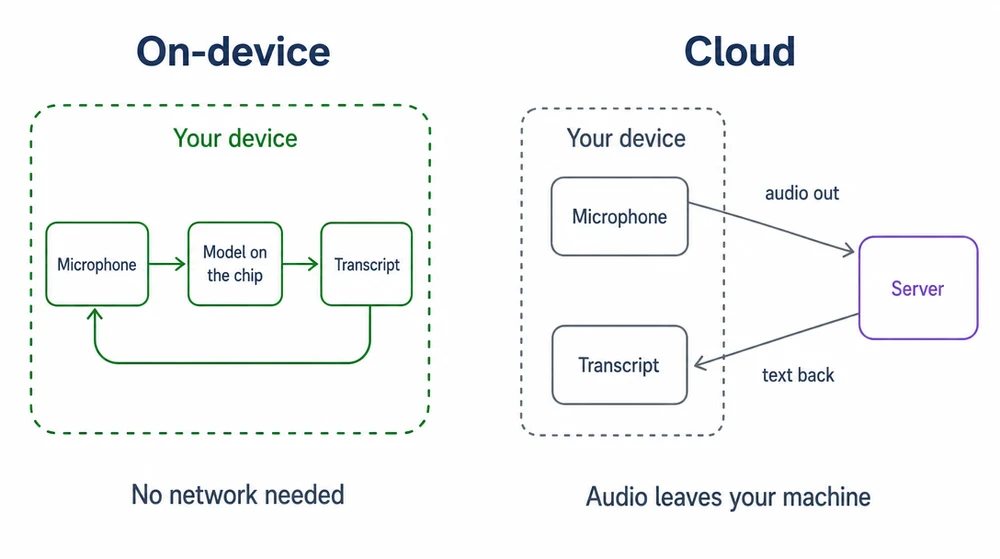
The practical read: most people recording meetings and lectures are fine on Tier 3 and should pick on accuracy and cost. People recording anything privileged or regulated should be on Tier 1 or 2, and no marketing claim from any vendor on this page — ours included — changes that.
Methodology & disclosure
How this comparison was put together, and what it is not.
We have not physically tested the hardware on this page. Device specifications, battery figures and prices come from manufacturer specification and pricing pages; behaviour claims come from documented user reports and manufacturer documentation. Where a device has been discontinued or acquired, we link the announcement. If you want hands-on reviews of the recorders themselves, this is not that page — it is a comparison of the four routes from spoken audio to text, and of what each costs and produces.
What we do test. The transcription accuracy figures are our own, measured on audio of the kinds these devices produce — headset-close speech, room recordings, phone audio, overlapping speakers — not on the devices themselves. Those numbers are stated by audio condition rather than as one figure, because the condition moves accuracy more than the choice of tool does.
Conflict of interest. VexaScribe is the Path 4 product on this page, and we publish this page — worth knowing when you read our recommendation of it. We have listed pricing for every alternative, named the cases where a competitor is the better buy, and pointed at locally-run open-source tools for anyone whose audio should not leave their machine, including where those beat us.
Ranking criteria. In order: transcription accuracy of the audio the device produces, total cost of ownership over a year, workflow friction from recording to usable text, and privacy posture. Devices are not ranked on build quality, microphone hardware, or anything else we would have to hold one to judge.
Verification. Prices and specifications verified September 2026 against manufacturer pages. Hardware pricing moves and models are discontinued without notice — check the manufacturer link before buying, and treat any price here as a guide rather than a quote.
Frequently Asked Questions
What's the best voice recorder with transcription in 2026?
Depends on the path. Hardware devices: Plaud Note (~$159, magnetic phone attachment, cloud sync) leads the AI-hardware category; Sony ICD-UX570 ($90 pro dictation recorder, upload audio for transcription elsewhere) leads traditional. Phone apps: Google Pixel Recorder (free, Android only, on-device transcription) and iOS Voice Memos with iOS 18 auto-transcription are the best zero-cost options. Web upload: record with any device, upload MP3/WAV to VexaScribe ($2/mo), TurboScribe, or Whisper installed locally (free). No single tool is best across all three paths — pick based on whether you value zero-workflow (Pixel/iOS), device quality (Plaud/Sony), or cheapest cost-per-file (web upload).
Does the iPhone have a built-in voice recorder with transcription?
As of iOS 18 (September 2024), yes. Voice Memos automatically transcribes recordings on iPhone 12 and later — tap the recording, then tap the transcript icon. Live Voicemail on iOS 17+ transcribes voicemails on-device. Earlier iPhones can use the free Apple Notes app dictation button (transcribes as you speak) or third-party apps like Otter, Notta, or the Just Press Record app. All Apple-native transcription runs on-device (no cloud upload), which matters for privacy-sensitive recordings.
Does Google Pixel have a voice recorder with transcription?
Yes, and it's free — Google Pixel Recorder is available on all Pixel phones (2019 onward) and runs transcription entirely on-device with no internet required. It supports 8 languages including English, Spanish, French, German, Italian, and Japanese. The transcript is searchable across your entire recording library. On Samsung phones with One UI 7+ (2024), Samsung Voice Recorder now offers similar transcript features. On other Android phones, install a third-party app or use Google Keep's voice notes feature.
Is Plaud Note worth $159?
Depends on your workflow. Plaud Note is a slim magnetic recorder that snaps to your phone and syncs recordings + AI transcripts + summaries to a companion app. It's marketed at professionals in meetings and interviews who don't want a bot in the room. Pros: excellent form factor, high-quality mic, cloud sync with GPT-4-based summaries, integration with Notion/Obsidian. Cons: monthly plan required for unlimited transcription minutes (~$79/year Pro tier); competing free options (Pixel Recorder, iOS Voice Memos) match transcription quality if you already have those phones. Worth it if you don't want to hold your phone during meetings and value the physical device; otherwise phone-native options are cheaper.
What's the difference between a voice recorder with transcription and just using an app?
Three practical differences: (1) Battery — hardware recorders (Sony, Olympus, Plaud, Soundcore) run 20+ hours; phone apps drain your battery during long meetings. (2) Storage — dedicated recorders often have 4-16 GB of internal storage plus SD-card slots; phone apps compete with your photos. (3) Discretion — a small physical recorder is less visible than holding a phone (matters for on-camera interviews). But: dedicated hardware costs $80-160 upfront, while phone apps cost $0-15/mo. For daily meetings, phone apps win; for interviews and depositions, hardware wins.
How do I transcribe a voice recording from any recorder?
The universal workflow: (1) transfer the file from your recorder — SD card, USB cable, Bluetooth, or cloud sync. Most recorders save as WAV, MP3, or M4A. (2) Upload the file to a web transcription tool: VexaScribe (5 GB per file, ~$2/mo), TurboScribe (5 GB, 3 free files/day), Whisper installed locally on your computer (free forever, requires Python + GPU). (3) Wait 5-10 min per hour of audio for processing. (4) Review speaker labels and proper nouns, then export as TXT/DOCX/SRT/PDF. This works for any brand of recorder — Sony, Olympus, TASCAM, Zoom, TC-Helicon — as long as it saves standard audio files.
Are there voice recorders that transcribe offline (no internet)?
Yes, several: (1) Google Pixel Recorder — transcribes entirely on-device, no internet needed. (2) iPhone Voice Memos (iOS 18+) — on-device transcription. (3) Samsung Voice Recorder (One UI 7+) — on-device. (4) Whisper installed on your laptop — runs 100% offline once installed, transcribes any audio file for free. Hardware recorders like Plaud Note and Soundcore Work AI record offline but require the cloud app for transcription. For genuine offline transcription plus recording, Pixel Recorder + Google Pixel phone is the simplest single-device option.
How accurate are voice recorder transcriptions?
In clean audio conditions (headset mic in quiet room), Whisper-based tools (VexaScribe, Plaud, Otter, Pixel Recorder) achieve 92-97% word accuracy per the Open ASR Leaderboard. Hardware recorders with built-in AI (Plaud, Soundcore Work) match this because they use Whisper under the hood. Accuracy drops on noisy audio (80-88%), heavy accents (85-92%), and technical vocabulary (80-90%). All vendor "99% accurate" claims are marketing; real word error rate on clean English is 3-8%. Higher-quality mics (dedicated recorders, headsets) shift the whole distribution upward — audio quality matters more than which tool you pick.
Can I still buy a Limitless Pendant in 2026?
No. Meta announced its acquisition of Limitless on December 5, 2025 and pendant sales ended the same day (reported by CNBC; announced by Limitless CEO Dan Siroker). If you are in the EU, UK, Brazil, China, Israel, South Korea or Turkey the service was withdrawn entirely on that date, so an existing unit is not a fallback either. Existing units keep working (Limitless has committed to backend support for at least a year), but the pendant is not sold to new customers. If you were looking at Limitless in 2026, the closest active alternatives are Plaud NotePin S ($179 — the current category leader) for a polished commercial product, or Omi (open-source hardware and software) for former Limitless users who now prioritize data ownership over vendor polish.
Plaud NotePin vs Otter — which for me?
Different capture modes. Plaud NotePin is a physical pin/pendant you wear all day — best for in-person interviews, hallway conversations, and any recording where you don't want to hold a phone. Otter is software with a meeting bot — best for Zoom/Teams/Meet calls where the bot auto-joins scheduled events. If 80% of your recordings are video meetings, Plaud is overkill. If 80% are in-person, Otter can't capture those. Both use Whisper-family speech-to-text underneath, so raw accuracy is similar in clean-audio conditions.
What's the best AI voice recorder in 2026?
For most buyers in 2026: Plaud NotePin ($159) or NotePin S ($179 — adds tactile button and all four wearing options). The Limitless Pendant would have been the top competitor but is discontinued after Meta's acquisition. If open-source and self-hosting matter, Omi is the alternative. If you don't need always-on and want the best mic quality, the EVISTR AI Voice Recorder (~$99-129) or Sony ICD-UX570 (~$90) plus web transcription is a cheaper path with higher audio quality.
Is there a voice recorder with transcription app that's free?
Yes — depending on your phone. Google Pixel Recorder is free on any Pixel phone with on-device transcription in 8 languages, no cloud, no signup. iOS Voice Memos on iOS 18+ auto-transcribes on iPhone 12 and later. Samsung Voice Recorder on One UI 7+ does the same on recent Galaxy phones. On other phones, Otter offers 300 minutes/month free (with per-conversation caps) and Notta offers 120 minutes/month free. For unlimited free with privacy, Whisper installed locally on your computer is free forever but requires Python + GPU setup.
Can I convert an existing voice recorder file to text?
Yes — this is the standard web-upload workflow. Transfer the file from your recorder (SD card, USB, cloud sync) to your computer or phone, then upload to VexaScribe, TurboScribe, HappyScribe, or Rev. Works for any brand — Sony, Olympus, TASCAM, Zoom, EVISTR, Plaud (via app export) — as long as the file is a standard audio format (WAV, MP3, M4A, FLAC, OGG). Cost is roughly $0.05-0.30 per hour of audio on Whisper-based web tools, or free forever with Whisper installed locally.
Does Google Pixel Recorder transcribe in real time?
Yes — Pixel Recorder shows the transcript as you speak, entirely on-device (no cloud upload). Currently supports English, Spanish, French, German, Italian, Japanese, and a couple more languages. The transcript is searchable across your whole Pixel Recorder library. This is the closest free experience to a $159 Plaud NotePin if you already have a Pixel phone.