Quick answer
Partially. ChatGPT Plus / Pro / Business transcribe audio two ways: Record mode (macOS desktop only, 4-hour session cap) captures live meetings and voice notes; GPT-4o file upload accepts MP3/WAV/M4A up to 25 MB (~10-15 min). ChatGPT Free cannot transcribe audio. No ChatGPT tier plays video files — extract audio first (FFmpeg, yt-dlp). Developers use the OpenAI API at $0.0045/min (gpt-transcribe, now the recommended model — whisper-1 was deprecated on 2026-08-26).
Have a file ChatGPT already refused? Transcribe it further down this page — five minutes free, no account, speaker labels included.
The 3 methods, ranked by usefulness
"ChatGPT transcription" means three different things depending on which product surface you're using. Ranked by how often each one is the right call:
1. Record mode
Availability: Plus / Pro / Business / Enterprise / Edu — macOS desktop app only
Use case: Live meetings, brainstorms, voice notes captured in the moment
Limits: 4-hour session cap (auto-stop), no speaker labels, English at launch
Verdict: Works well for solo capture + single-speaker interviews on macOS
2. File upload (GPT-4o)
Availability: Plus / Pro / Business — all platforms
Use case: Transcribing existing audio files (MP3, WAV, M4A, WebM)
Limits: 25 MB per file (~10-15 min at typical bitrates), no timestamps, no speaker labels
Verdict: Works in practice but not officially documented by OpenAI — behavior may change
3. Voice dictation
Availability: All tiers — mobile + desktop microphone button
Use case: Dictating a message into a chat
Limits: Not for transcribing existing files — mic input only
Verdict: Common misunderstanding — this is speech-to-input, not audio-to-transcript
Capability by ChatGPT tier
What each ChatGPT plan can and cannot do for transcription. Verified against OpenAI's ChatGPT Record help article, chatgpt.com/pricing, and MacRumors' 2025-07-17 Plus rollout confirmation.
| Tier | Record mode | Audio file upload | Video direct |
|---|---|---|---|
| ChatGPT Free | ❌ Not available | Text-only (PDF, DOCX, images, XLSX, TSV, CSV) | ❌ No |
| ChatGPT Go ($8/mo) | ❌ Not available | Higher upload limits than Free — audio behaviour undocumented | ❌ No |
| ChatGPT Plus ($20/mo) | ✓ macOS desktop only | ✓ MP3/WAV/M4A/WebM up to 25 MB (undocumented but works) | ❌ No — extract audio first |
| ChatGPT Pro ($200/mo) | ✓ macOS desktop only | ✓ Same as Plus + higher usage caps | ❌ No — extract audio first |
| ChatGPT Business ($25/seat) | ✓ macOS desktop only | ✓ Same as Plus + workspace controls | ❌ No — extract audio first |
| ChatGPT Enterprise / Edu | ✓ macOS desktop — admin-configurable per workspace | ✓ Admin-configurable | ❌ No — extract audio first |
| OpenAI API (developer) | N/A — direct model access | ✓ 25 MB per request | MP4 accepted but audio-track only |
Common misunderstanding: "ChatGPT can transcribe" conflates the Record feature (macOS desktop live capture) with the GPT-4o file upload (existing audio files, undocumented but functional) with the OpenAI API (developer endpoint, separate product). Different limits, different platforms, different results.
ChatGPT Record mode — deep dive
ChatGPT Record is OpenAI's built-in live audio capture, rolled out to Plus users globally on July 17, 2025. It captures meetings, brainstorms, lectures, and voice notes in real time and produces a transcript plus AI-generated notes.
Availability (verified 2026-09-09)
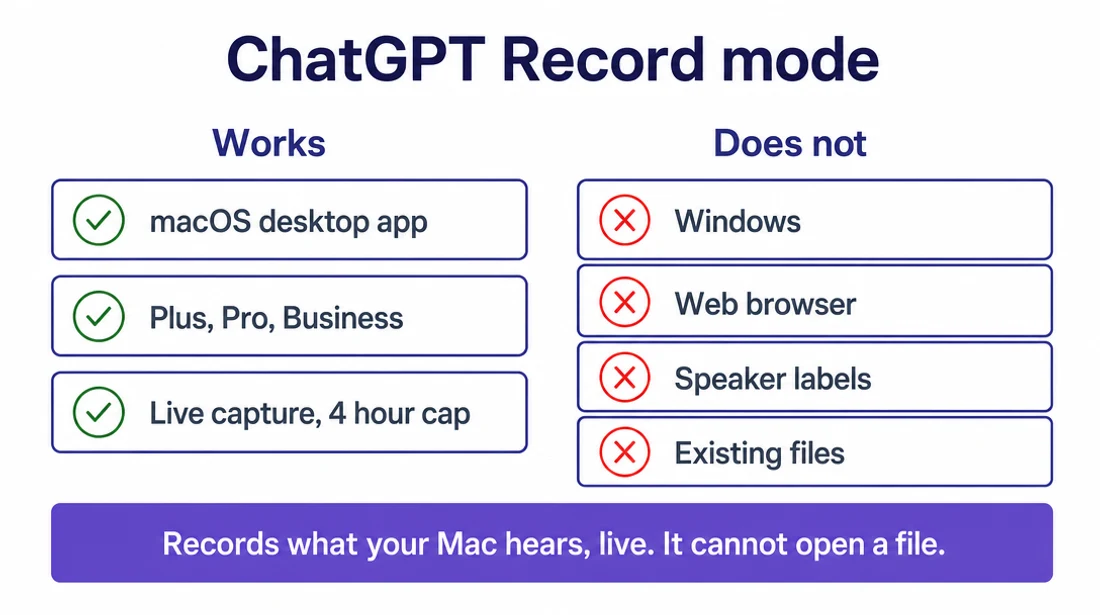
- macOS desktop app only. Windows support has no announced roadmap. Web ChatGPT does not have Record.
- Plans: Plus, Pro, Business, Enterprise, Edu. Not available on Free.
- Enterprise admins can disable Record per workspace.
Session limits
- 4-hour cap (240 min) per session. Sessions exceeding this stop automatically and generate notes uploaded as a private canvas.
- No hard file-size limit for the resulting transcript (it's stored in the chat).
- Language support: English at launch, expanding gradually.
Output
- Transcript — single-track prose, no speaker labels.
- Summary — auto-generated overview.
- Time-stamped citations — clickable references from the summary back into the transcript. This is the differentiator vs plain transcription tools.
- Suggested follow-ups — action items and next-step prompts.
- All output appears in a canvas you can edit or export.
Privacy
- Audio recordings are deleted after transcription. Only the transcript persists (in your chat history until you delete it).
- OpenAI does not train models on Record audio. Stated directly in the help article: "We do not use these audio recordings to train our models."
- The transcript is a different question from the audio. Transcripts and canvases can be used for training on Free, Plus and Pro where "Improve the model for everyone" is switched on. The audio is deleted either way — the text it produced is what the setting governs.
- Business, Enterprise and Edu are excluded from training by default. Record is also disabled by default on Enterprise and Edu workspaces until an admin turns it on.
Steps
- Open the ChatGPT macOS desktop app.
- Start a new chat. Click the Record icon in the input bar.
- Grant microphone permission. Recording starts. Audio is captured on-device and streamed to OpenAI for real-time transcription.
- Speak, or let the meeting audio play through your Mac speakers (Record captures system audio too).
- Click stop. The canvas opens with the transcript, a summary, and suggested follow-ups.
- Ask ChatGPT to reformat, extract action items, translate, or restructure — all in the same chat.
ChatGPT dictation — the third method, and the usual mix-up
The microphone button in the ChatGPT app is dictation, not transcription. It is available on every tier, Free included, on mobile and desktop. You speak, and your words become the text of the message you are about to send. That is speech-to-input.
It cannot transcribe a file. There is nowhere to attach one — the microphone only listens to your microphone, live, for as long as you hold the conversation. People on the Free tier often find this button, assume they have found audio transcription, and then discover there is no way to point it at the recording sitting on their desk. There isn't one: Free has dictation and nothing else.
It is genuinely good at what it does. Dictating a long prompt is faster than typing it, and the punctuation inference is solid. Just don't plan a transcription workflow around it — for an existing file you need Record (macOS, paid), the GPT-4o upload (paid), the API, or something else entirely.
Transcribing existing audio files (GPT-4o upload)
Since GPT-4o launched in 2024, ChatGPT Plus / Pro / Business accept audio file uploads directly in chat. It processes the audio through Whisper server-side and returns a transcript in the chat. Important caveat: as of 2026-09-09, OpenAI's official "supported file types" documentation lists only "all common file extensions for text files, spreadsheets, presentations, and documents". Audio appears nowhere in it. Upload works in practice but is not formally documented — meaning behaviour could change without notice, and there is no published limit to appeal to when it does. The 25 MB figure below comes from OpenAI's API documentation, which is explicit; the chat window's behaviour with audio is an observation, not a documented guarantee.
What works
- Formats: MP3, WAV, M4A, WebM. MP3/M4A most consistent.
- Size limit: 25 MB per file (matches the OpenAI API limit).
- Duration: ~10-15 minutes of typical-bitrate audio fits under 25 MB.
- Output: prose transcript in chat, no timestamps, no speaker labels.
- Post-processing: same chat can then summarize, translate, extract action items.
What doesn't work well
- Files over 25 MB — hard fail.
- Files under 25 MB but over ~10 minutes — often returns incomplete transcripts without warning.
- Multi-speaker audio — no diarization.
- Accented English, overlapping speech, technical vocabulary — accuracy drops below 80%.
- Non-English audio — supported by Whisper but Record UI + processing prioritizes English.
How to split larger files
For files over 25 MB or longer than 10 minutes, split with FFmpeg into ~10-min chunks:
ffmpeg -i input.mp3 -f segment -segment_time 600 -c copy chunk%03d.mp3Upload each chunk separately to ChatGPT, then concatenate the transcripts. Or use the OpenAI Whisper API which handles the same 25 MB limit per request but is designed for chunking workflows. For hands-off single-upload processing of long files, a hosted transcription service handles this natively.
Transcribing video with ChatGPT
No ChatGPT tier plays video files directly. Not Free, not Plus, not Pro. Uploading an MP4 to a chat either fails or extracts nothing useful. The OpenAI API accepts MP4 but transcribes only the audio track — the visual content is ignored. Every "ChatGPT transcribes video" workflow is really a two-step: extract audio, then transcribe audio.
Standard workflow
- Extract audio from the video:
- FFmpeg (free CLI):
ffmpeg -i video.mp4 -vn -c:a copy audio.m4a - yt-dlp for YouTube:
yt-dlp -x --audio-format mp3 [URL] - QuickTime on Mac: File → Export As → Audio Only
- Online: audio-extractor.net, Kapwing extract-audio
- FFmpeg (free CLI):
- Verify the audio file is under 25 MB and ~10 min.
- Upload to ChatGPT Plus/Pro/Business, or use Record playback capture, or send to the OpenAI API.
- Ask ChatGPT to reformat, summarize, extract action items.
Shortcut — skip the two-step
Dedicated transcription services read the video directly: VexaScribe accepts MP4/MOV/MKV/WebM/AVI up to 200 MB with no account (5 GB once you have a free one), extracts the audio internally, and returns the transcript with speaker labels — one upload, one download, no CLI.
The realistic workflow — post-hoc, not live
Every ChatGPT-transcription review that actually tested the product (tldv, meetgeek, jotme, umevo) lands on the same conclusion: the realistic workflow for a meeting is after the fact. Record the call somewhere else, export the file, upload it, and hope it comes back usable.
Record mode helps in a narrow band: solo brainstorms captured on macOS, single-speaker interviews under 4 hours, voice notes. It falls apart for the workflows people actually want to use it for.
Where Record actually shines
- Solo brainstorm or voice memo on a Mac (single speaker, English, under 4h)
- 1-on-1 interview where you don't need speaker labels (mark them by hand later)
- Short lectures or study capture where AI-generated notes are the primary output
- Ideation sessions where the summary matters more than the raw transcript
Where Record falls apart
- Multi-speaker meetings — no diarization means everyone becomes one voice
- Long recordings over 4h — session auto-stops mid-flow
- Non-English audio — support is expanding but launch was English-only
- Windows / mobile — no support as of 2026-09-09
- Batch processing — no CLI, no API, no queue
- Zoom/Teams/Meet calls — Record captures system audio locally, but purpose-built meeting bots (Otter, Fireflies, Fathom) integrate directly with the calendar and produce speaker-labeled notes
Prompts that work with ChatGPT + a transcript
ChatGPT's real strength is post-processing existing transcripts — cleanup, formatting, summarization, translation. It is not the transcription engine; Whisper (or whatever ASR you used) is. Five prompt patterns that reliably produce useful output:
Add punctuation and paragraphs
You will receive an unpunctuated transcript. Add standard sentence punctuation, capitalize proper nouns and sentence starts, and break the text into paragraphs where the speaker changes topic. Do NOT change any words. Do NOT add facts. Return only the cleaned text.Why it works: ChatGPT excels at post-processing existing text. This prompt keeps hallucination risk low by forbidding word changes.
Infer speaker labels (2-person interview)
This is a two-person interview transcript. Label each turn with Speaker 1: or Speaker 2:. If you cannot tell who is speaking, mark the turn [SPEAKER ?]. Do not invent dialogue.Why it works: GPT-4 can infer speaker changes from linguistic cues (question-answer patterns, name references). The [SPEAKER ?] escape hatch prevents fabrication. Fragile beyond 2 speakers.
Enforce a glossary
Below is a transcript that references these terms: [Vercel, Next.js, Turbopack, App Router]. Correct any misspellings of these terms to match this exact casing. Leave all other text unchanged.Why it works: Whisper often mangles technical vocabulary. ChatGPT can fix domain-specific terms without touching the rest.
Flag low-confidence sections
In this transcript, find any sentence that looks garbled, contains repeated tokens, or has numbers/proper nouns that seem out of context. Wrap each in [FLAG: reason]. Return the full transcript with flags inline.Why it works: Turns ChatGPT into a QA pass. Human reviewer then only reads the flagged sections.
Extract action items with quoted context
From this meeting transcript, list every action item as: '[Owner if named]: [action], because [1-sentence quote from transcript]'. If owner is unclear, mark [UNASSIGNED]. Do not invent action items — only extract what is explicitly discussed.Why it works: Meeting notes are the #1 real ChatGPT use case. Requiring quoted context forces grounding.
Prompts that fail (and what to do instead)
Common requests that don't work — and the actual working path for each.
"Transcribe this YouTube video" (paste URL)
What people try: Sending a URL and asking ChatGPT to transcribe.
What actually happens: ChatGPT cannot fetch video URLs or play video files. Even with browsing enabled, it can read the page metadata — not the audio track. On Free tier, it declines or hallucinates a plausible-sounding fake transcript. On Plus, it politely refuses.
Fix: Extract audio first (yt-dlp: yt-dlp -x --audio-format mp3 [URL]), then upload the MP3 (Plus/Pro) or use the OpenAI API.
"Upload this 45-minute podcast" (large file)
What people try: Uploading a large MP3 (over 25 MB or over ~10 min) to a Plus chat.
What actually happens: Upload fails past 25 MB. Files under 25 MB but longer than ~10 min often return incomplete transcripts — ChatGPT stops mid-file without warning.
Fix: Split the file with FFmpeg (ffmpeg -i input.mp3 -f segment -segment_time 600 -c copy chunk%03d.mp3) and process chunks separately. Or use the OpenAI API at $0.006/min. Or use a hosted transcription service that handles long files natively.
"Transcribe verbatim, including every uh and um"
What people try: Asking ChatGPT to preserve filler words from an already-cleaned transcript.
What actually happens: Whisper drops most filler words during transcription. ChatGPT cannot add them back — the information is gone.
Fix: Configure Whisper at the transcription step with the correct decode parameters, not after. faster-whisper's word_timestamps=True + no VAD filtering preserves more fillers.
"Fix the timestamps in this SRT"
What people try: Asking ChatGPT to re-time SRT cues to match audio.
What actually happens: ChatGPT cannot listen to audio and cannot align text to waveform. It will invent plausible-looking timestamps that drift by the end of the file.
Fix: Re-transcribe with WhisperX or faster-whisper (both produce word-level timestamps), or manually adjust in Subtitle Edit / Aegisub.
"Diarize this transcript — say who is speaking"
What people try: Asking Record output or a Whisper transcript to be split by speaker.
What actually happens: For 3+ speakers with no linguistic cues (no name references, no distinct speech patterns), ChatGPT guesses. Guesses look confident and are wrong.
Fix: Use a diarization-enabled service at the transcription stage (VexaScribe, Otter, Rev, AssemblyAI, Deepgram). Diarization is an audio-processing task, not a text task.
File-size, duration limits + OpenAI API pricing
Limits by interface
| Interface | Max file size | Max duration | Notes |
|---|---|---|---|
| Record (Plus/Pro/Business/Enterprise) | N/A (live capture) | 4h per session (auto-stop) | macOS desktop only |
| GPT-4o audio upload (Plus/Pro/Business) | 25 MB | ~10-15 min effective | MP3/WAV/M4A/WebM, undocumented feature |
| Text file upload (all tiers) | 512 MB | N/A | PDF/DOCX/XLSX/etc. — no ASR |
| OpenAI API /v1/audio/transcriptions | 25 MB per request | ~25 min at 128 kbps MP3 | Split longer files client-side |
OpenAI API pricing (transcription models, verified 2026-09-09)
Four transcription models were deprecated on 2026-08-26 and are removed from the API on 2027-02-26: whisper-1, gpt-4o-transcribe, gpt-4o-mini-transcribe, and gpt-4o-transcribe-diarize. Most guides on this topic still recommend whisper-1. If you are starting something new, start on gpt-transcribe — it is OpenAI’s own recommendation and costs less.
| Model | Status | Per minute | Per hour | Notes |
|---|---|---|---|---|
| gpt-transcribe | Current | $0.0045 | $0.27 | OpenAI’s recommended transcription model — “start with gpt-transcribe”, per their speech-to-text guide. Cheapest of the file-based options. |
| gpt-live-transcribe | Current | $0.017 | $1.02 | Live streaming transcription over a socket. For real-time voice apps, not batch files. |
| gpt-4o-transcribe-diarize | Deprecated | $0.006 | $0.36 | The one OpenAI endpoint that returns speaker labels. Deprecated — removed 2027-02-26. |
| whisper-1 | Deprecated | $0.006 | $0.36 | The model most tutorials still recommend. Deprecated 2026-08-26, removed 2027-02-26. Migrate to gpt-transcribe. |
| gpt-4o-transcribe | Deprecated | $0.006 | $0.36 | Deprecated 2026-08-26, removed 2027-02-26. |
| gpt-4o-mini-transcribe | Deprecated | $0.003 | $0.18 | Deprecated 2026-08-26, removed 2027-02-26. |
Per-minute billing, no minimum, no publicly-listed volume discount. All of these cap requests at 25 MB per file — the same ceiling as the chat upload, and the reason long-file workflows need chunking whichever route you take. Test on your own audio before standardising: model behaviour differs by length and content type, and the cheapest model is not always the one that needs least cleanup afterwards. See how accurate is Whisper for third-party comparison data.
Accuracy — honest limits
This page used to carry a table of accuracy percentages. It no longer does, and the reason is worth stating plainly: we could not stand behind the numbers. They came from third-party tests that did not publish a methodology we could inspect, on model versions that OpenAI has since replaced. A figure like "80-86%" looks precise and rigorous; in practice it was a number copied between articles, ours included, without anyone re-running the test.
What can be said honestly is this. Word error rates on clean, single-speaker audio have fallen far enough across every serious engine that accuracy is rarely the thing that decides the outcome any more. What decides it is structure: whether you get speaker labels, whether you get timestamps, whether the file gets in at all. Those are checkable facts rather than contested measurements, so those are what this table compares.
| Route | Speaker labels | Timestamps | Output | Note |
|---|---|---|---|---|
| ChatGPT Record / file upload | ❌ None | ❌ None | Prose in the chat | Post-processing in the same chat is the real advantage — summarise, translate, extract actions without moving the text anywhere. |
| OpenAI API (gpt-transcribe) | ❌ None | ✓ Segment-level | JSON / text / SRT / VTT | OpenAI’s recommended model. 25 MB per request, so long files need chunking in your own code. |
| OpenAI API (gpt-4o-transcribe-diarize) | ✓ Speaker labels | ✓ Segment-level | JSON with speakers | The one OpenAI route that labels speakers — but deprecated, removed 2027-02-26. |
| Self-hosted Whisper | ❌ (add pyannote separately) | ✓ Segment-level | TXT / SRT / VTT / JSON | Audio never leaves your machine. Needs a capable computer and setup time. |
| Dedicated services | ✓ Usually included | ✓ Included | TXT / SRT / VTT / DOCX | Speaker labels and subtitle formats without writing code. VexaScribe, Otter, Rev, Descript, AssemblyAI, Deepgram. |
Where ChatGPT does still lose ground is the hard stuff every engine finds hard: heavy accents, crosstalk, technical vocabulary, poor microphones. The difference is that a dedicated tool hands you speaker-separated text you can correct, while ChatGPT hands you a single block of prose in which you cannot tell who said what. The only test that settles it is your own audio through both.
Privacy — who keeps your audio, and for how long
Recordings are among the most sensitive files people upload anywhere: client calls, medical consultations, interviews with named sources, family conversations. "Does this get used to train a model" is a fair question to ask of any transcription tool, this one included. Here is what each side documents.
OpenAI's documented position
- Record mode audio is deleted after transcription. Only the transcript stays, in your chat history until you delete it — per the ChatGPT Record help article.
- OpenAI does not train on Record recordings. Business, Enterprise, and Edu carry contractual non-training defaults. Plus and Pro follow standard ChatGPT privacy settings, where training on your content is a setting you can switch off.
- The API is separate from ChatGPT. API inputs are not used for training by default — a different policy from the consumer chat interface, and a common source of confusion when people cite one to justify the other.
- Files you upload to a chat are not Record audio. An audio file attached to a conversation is governed by your normal ChatGPT data controls, not by the Record deletion behaviour above.
Ours
- We do not train models on your uploads. Not on the audio, not on the transcripts.
- Your transcripts stay while your account does. They are yours to keep, and yours to delete individually at any time. Delete the account and we remove your personal data within 30 days — the full terms are on our privacy page, which is the authoritative version of all of this.
- The free preview needs no account. There is nothing to sign in to and nothing tied to your identity, because we never asked for it.
If the recording is genuinely sensitive — privileged, medical, or covered by an NDA — the safest answer is not any hosted tool, ours included. It is running Whisper locally, where the audio never leaves your machine. That is slower and needs a capable computer, and for a great many recordings it is more caution than the situation calls for. But when it matters, it is the option with the fewest parties involved.
When to skip ChatGPT for transcription
ChatGPT is a good post-processor and a fine live-recording tool for macOS Plus/Pro/Business users. It is not the right first choice when any of the following applies:
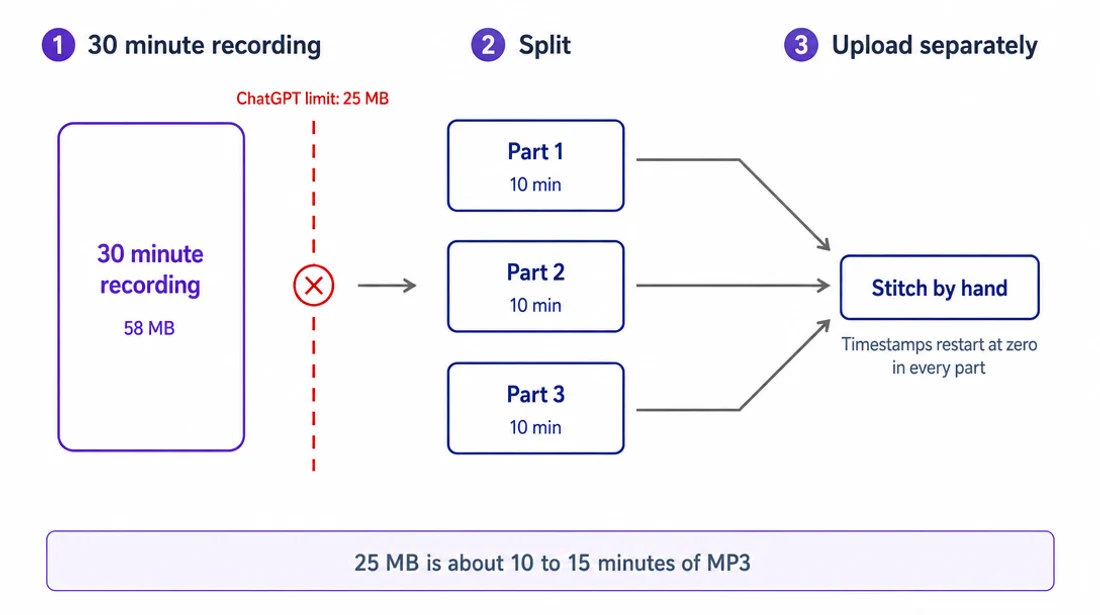
The arithmetic, before the list. 25 MB is roughly 10 to 15 minutes of typical MP3. A one-hour meeting is about 58 MB, so it does not go in. Splitting it by size alone is not enough either: files that fit under 25 MB but run longer than about ten minutes often come back incomplete, which is why the FFmpeg command earlier on this page cuts at ten-minute marks rather than at the size limit. An hour becomes six uploads and a manual stitch, with timestamps restarting at zero in every part. Two hours becomes twelve. Record mode avoids the splitting but only on a Mac, only up to four hours, and only for audio you are capturing live: it cannot open a file that already exists. No tier ingests video at all.
For a short voice note none of this matters. For an interview, a lecture, or anything with more than one person in the room, the splitting and stitching is the work — and at the end you still have prose with no idea who said what.
- You have existing audio or video files over 25 MB. Use a dedicated service or the OpenAI API with chunking.
- You need speaker labels. No ChatGPT interface produces them — Record and file upload both return single-track prose. OpenAI’s API has one diarizing model, gpt-4o-transcribe-diarize, but it was deprecated on 2026-08-26 and is removed in February 2027, which makes it a poor thing to build on now. Dedicated services (VexaScribe, Otter, Rev, AssemblyAI, Deepgram) do it as standard.
- Your audio is longer than ~2 hours. API caps requests at 25 MB; Record caps at 4h. Neither handles 8h all-hands or day-long court testimony gracefully.
- You need SRT / VTT / word-level timestamps. ChatGPT output is prose; dedicated tools produce subtitle formats.
- You're on ChatGPT Free. Record isn't available; you're restricted to pasting existing transcripts.
- You're on Windows. Record has no announced Windows roadmap.
- You're processing high volumes. Per-minute API pricing is cheap for individuals, expensive for batch operations; self-hosted Whisper or a hosted subscription is more predictable.
- Meeting transcription with participants. Purpose-built meeting bots (Otter, Fireflies, Fathom, tldv) integrate with your calendar, join Zoom/Teams/Meet as a participant, and produce speaker-labeled notes.
What a dedicated tool adds
Not accuracy — that argument is mostly over, and the accuracy section above explains why we stopped making it. What a purpose-built tool adds is structure and the things you do with a transcript after you have it. In our case:
- Automatic speaker labels — multi-speaker, renameable in the editor — and timestamps on every transcript and every export.
- Exports: TXT, SRT, VTT, DOCX, CSV, JSON. Word-level timestamps come in the JSON export.
- AI summary in meeting, sales, lecture and podcast formats — the one thing every competitor on this topic also does.
- AI chat — ask questions, answers cite the timestamp. This is the ChatGPT habit you already have, pointed at a transcript that knows who spoke and when.
- Translate the transcript in place — free translations included; premium keeps proper names as names and idioms natural.
- Bulk upload and bulk export, an editor with audio-synced playback, and 99 languages detected automatically.
No per-minute billing, no chunking, no prompt engineering. Full detail on the audio transcription page.
Hit ChatGPT's limits? Drop the file here.
The files ChatGPT turns away — over 25 MB, video, hour-long recordings. Up to 200 MB free here with no account, 5 GB with a free one. You get the first five minutes back with speaker labels, timestamps, and a downloadable .srt or .txt.
Drop your audio file here
or click to browse
Audio: MP3 · WAV · M4A · FLAC · OGG · AAC · AIFF · WMA · AMR · OPUS
Video: MP4 · MOV · AVI · MKV · WebM · FLV · WMV
Up to 200 MB · first 5 minutes free, no account
Free 5-minute preview · no account · files up to 200 MB · sign up free for 30 minutes and 5 GB files
Verified sources
Every capability, limit, and price on this page was re-checked against these sources on 2026-09-09:
- OpenAI Help Center — ChatGPT Record (feature, tier availability, privacy)
- chatgpt.com/pricing (Free / Plus / Pro / Business / Enterprise / Edu plans)
- MacRumors — ChatGPT Plus Gets Record Mode on Mac (July 17, 2025 global Plus rollout)
- AIbase — ChatGPT Voice Recording Mode Now Fully Available (macOS-only scoping)
- OpenAI API pricing (per-minute rates for every transcription model)
- OpenAI API deprecations (the 2026-08-26 transcription-model deprecations and their 2027-02-26 shutdown)
- OpenAI speech-to-text guide (25 MB request limit, supported formats, the gpt-transcribe recommendation)
- Accuracy percentages were removed from this page on 2026-09-09. The third-party tests they came from did not publish inspectable methodology and covered model versions OpenAI has since replaced — see the accuracy section for what replaced them.
- Session cap (4h auto-stop) confirmed via Sally.io, tldv.io, and Noota independent reviews
Frequently asked questions
Can ChatGPT transcribe audio?
Yes, in three ways. (1) Record mode on ChatGPT Plus/Pro/Business — macOS desktop only, 4-hour session cap, captures live audio and produces a transcript, a summary and suggested follow-ups. (2) GPT-4o file upload on Plus/Pro/Business — accepts MP3/WAV/M4A/WebM up to 25 MB (~10-15 min). Not officially documented but works in practice. (3) OpenAI API — $0.0045/min for gpt-transcribe, the current recommended model; whisper-1, gpt-4o-transcribe, gpt-4o-mini-transcribe and gpt-4o-transcribe-diarize were all deprecated on 2026-08-26 and are removed 2027-02-26. ChatGPT Free cannot transcribe audio files. Verified 2026-09-09.
Can ChatGPT transcribe video?
No ChatGPT tier plays video files directly. Uploading MP4 to a chat either fails or ignores the audio. The OpenAI API accepts MP4 but transcribes only the audio track — visual content is ignored. Working workflow: extract audio first (FFmpeg: ffmpeg -i video.mp4 -vn -c:a copy audio.m4a, or yt-dlp for YouTube), then upload the audio to ChatGPT Plus (under 25 MB) or use the API. For hands-off single-upload video-to-text, use a dedicated service like VexaScribe that reads MP4/MOV/MKV directly.
Can ChatGPT transcribe video to text?
Not directly — no ChatGPT interface plays video. Two-step workflow: (1) Extract audio with FFmpeg, yt-dlp, or QuickTime Export → Audio Only. (2) Send the audio to ChatGPT Plus/Pro/Business via Record playback capture (macOS), GPT-4o upload (all platforms, 25 MB limit), or the OpenAI Whisper API. For long videos or multi-speaker content, use a purpose-built service — ChatGPT lacks diarization and struggles with files over ~10 minutes.
How to ask ChatGPT to transcribe a video?
Skip the direct ask — ChatGPT will decline or hallucinate. Working path: (1) extract audio with FFmpeg (ffmpeg -i video.mp4 -vn -c:a copy audio.m4a), (2) if under 25 MB upload to ChatGPT Plus/Pro/Business directly, or use Record mode on macOS while playing the audio, or send to the OpenAI API at $0.006/min. (3) then paste-or-continue in the same chat to summarize, extract action items, or reformat.
Can ChatGPT convert videos to text?
Not directly — no ChatGPT interface plays video. Use a two-step: extract audio (FFmpeg, yt-dlp, QuickTime Export → Audio Only), then transcribe via ChatGPT Record (macOS Plus/Pro/Business), GPT-4o upload (Plus/Pro/Business, 25 MB limit), the OpenAI Whisper API ($0.006/min), or a dedicated service that handles both steps in one upload.
Is there an AI that can transcript a video?
Yes — dedicated transcription services (VexaScribe, Rev, Otter, Descript, AssemblyAI, Deepgram) accept video files directly, extract audio internally, and return transcripts with speaker labels and timestamps. Most run OpenAI Whisper large-v3 or a comparable model under the hood. Direct-to-video is what ChatGPT lacks; dedicated tools have it.
Can ChatGPT read videos?
No — ChatGPT cannot decode or play video files (MP4, MOV, MKV, WebM). Uploading a video to a chat does nothing useful. You must extract the audio track first (FFmpeg -vn flag, yt-dlp -x, or online extractor), then transcribe the audio via ChatGPT Plus upload, Record mode, or the OpenAI API. ChatGPT can then process the resulting transcript text.
Can ChatGPT convert audio to text?
Yes on Plus/Pro/Business tiers. Two paths: Record mode (macOS desktop, 4-hour session cap, live capture) and GPT-4o file upload (all platforms, 25 MB / ~10-15 min per file, undocumented but functional). Free tier cannot. Developers use the OpenAI API at $0.0045/min for gpt-transcribe, now OpenAI's recommended model — whisper-1 and three sibling models were deprecated on 2026-08-26 and are removed in February 2027. Output is prose: no timestamps, no speaker labels.
Can ChatGPT transcribe audio for free?
No — ChatGPT Free does not include audio transcription. Free workarounds that produce a transcript you can then paste into Free-tier ChatGPT for cleanup: self-hosted Whisper (free, requires install), free tiers of hosted services (VexaScribe includes 30 minutes; others vary), or OpenAI API's ~$0.006/min minimum cost.
Can ChatGPT transcribe an MP3?
Yes, on Plus/Pro/Business. Upload the MP3 straight into a chat — GPT-4o accepts MP3, WAV, M4A, and WebM up to 25 MB, which is roughly 10-15 minutes of typical MP3 audio. Longer files must be split first, and files over about 10 minutes often come back incomplete even when they fit. Free tier cannot. Output is prose with no speaker labels and no timestamps.
Can ChatGPT transcribe a YouTube video?
No. ChatGPT cannot open URLs to fetch media, and no tier plays video. Download the audio first (yt-dlp -x --audio-format mp3 URL), then upload it if it is under 25 MB. For anything longer, a dedicated tool that reads the file directly is fewer steps.
Can ChatGPT transcribe audio on iPhone?
Partly. The iOS app has voice dictation on every tier, which turns your speech into message text — that is not file transcription. File upload works in the iOS app on Plus/Pro/Business, same 25 MB limit. Record mode is macOS desktop only, with no iOS client as of 2026-09-09.
Does ChatGPT transcription work in other languages?
Yes. The underlying Whisper model handles roughly 99 languages, and GPT-4o upload transcribes non-English audio without extra configuration. Accuracy drops further than English on accented or code-switched speech. ChatGPT Record shipped English-first; other languages have followed unevenly.
Is ChatGPT transcription free?
No. ChatGPT Free has voice dictation only — speaking your message instead of typing it. Transcribing an audio file needs Plus, Pro, or Business (from $20/month), or the OpenAI API at $0.006/min. Free-tier users can paste a transcript produced elsewhere and have ChatGPT clean it up.
Which iPhone models support the built-in Notes transcript?
Not applicable to ChatGPT — that's iOS 18 Apple Notes, not ChatGPT. If you meant ChatGPT on iPhone: the ChatGPT iOS app supports voice dictation on all tiers (dictate into a chat) and displays Record output from macOS sessions synced via chat history. ChatGPT Record itself is macOS desktop only as of 2026-09-09; no iOS Record client exists.
Does the ChatGPT Record feature work on Windows?
No, not as of 2026-09-09 — every ChatGPT release note through 2026-09-08 was checked and Record has not moved off macOS. OpenAI has referred to "future expansion" without an announced date for Windows or web-app support. Windows Plus/Pro/Business users can still use GPT-4o audio file upload (Plus/Pro/Business tiers, MP3/WAV/M4A/WebM up to 25 MB), the voice dictation microphone button in mobile/desktop chats, or the OpenAI API directly.
How long can ChatGPT Record sessions be?
4 hours (240 minutes) per session. Sessions exceeding this cap stop automatically and generate notes uploaded as a private canvas. No hard file-size limit on the resulting transcript. For 6-8+ hour capture (all-hands, day-long conferences), split the session manually or use a purpose-built meeting recording tool.
Are ChatGPT Record audio files stored by OpenAI?
No — per OpenAI's help documentation, Record mode audio recordings are used only for transcription and deleted afterward. Only the transcript persists in your chat history until you delete it. OpenAI does not train models on Record recordings. Team, Business, and Enterprise plans have contractual non-training defaults; Plus and Pro follow standard ChatGPT privacy settings with opt-out controls available.
What's the difference between ChatGPT Record and the OpenAI Whisper API?
Record is a live-capture consumer feature in the ChatGPT macOS desktop app (Plus/Pro/Business/Enterprise/Edu). The OpenAI Whisper API is a developer endpoint (api.openai.com/v1/audio/transcriptions) that accepts existing audio files up to 25 MB and returns text — no ChatGPT interface required. Record is for meetings you're in right now; the API is for batch processing existing files. The API supports whisper-1, gpt-4o-transcribe, and gpt-4o-mini-transcribe models at different price points.